Canva Pinterest Post (2026): How to Create Pins That Get Clicks, Saves, and Traffic
Have you ever spent a long time making a beautiful graphic for Pinterest, uploaded it, and then… nobody clicked on it?
It is a super frustrating feeling! The truth is, just making a layout look pretty isn’t enough anymore. If you want to actually grow your online business, you need to know how to create winning Canva Pinterest posts. A great pin needs to catch someone’s eye immediately while they are scrolling through their phones. Let’s walk through an honest, simple plan to help you design popular pins that look amazing and bring thousands of real visitors straight to your website.
Want to create better Pinterest designs with Canva? These related guides can help you choose the right features, improve your visuals, and find more ideas for your Canva projects:
- How to Outline Text in Canva
- Best Sans Serif Fonts on Canva
- Canva Free vs Pro (Honest Comparison for 2026)
- Digital Product Ideas (2026): Best Things to Sell Online for Beginners and Creators
- Best Aesthetic Canva Fonts (2026): Stylish Fonts for Beautiful Designs, Branding, and Social Media
What Is a Canva Pinterest Post?
A Canva Pinterest post is a Pinterest pin or visual graphic created inside Canva for publishing on Pinterest.
These posts are usually vertical images designed to attract attention and encourage users to click, save, or explore more.
Common uses:
- Blog promotion
- Affiliate marketing
- Etsy product traffic
- Lead generation
- Brand awareness
- Recipe sharing
- Course promotion
- YouTube traffic
- Email list growth
Why Pinterest Posts Matter
Pinterest behaves more like a search engine than many people realize.
Users search ideas, solutions, inspiration, and products.
That means one good pin can continue bringing traffic long after posting.
Strong Pinterest posts can help with:
- Website traffic
- Product visibility
- Evergreen discovery
- Audience growth
- Sales opportunities
- Email subscribers
A beautiful post is nice. A clickable post is better.
Master Pinterest Success Table
| Element | What to Do | Why It Matters | Pro Tip |
| Size | Use vertical format | Better screen space | Tall pins stand out |
| Headline | Clear benefit-driven text | Increases clicks | Promise value fast |
| Image | Relevant, clean visual | Stops scrolling | Use strong contrast |
| Branding | Add style consistency | Builds trust | Keep colors consistent |
| CTA | Guide next action | Improves engagement | Use subtle prompts |
| Keywords | Match search intent | Helps discovery | Use buyer language |
| Readability | Large easy text | Mobile users decide fast | Avoid tiny fonts |
| Variations | Make multiple pins | More testing chances | Change headlines |
| Quality | Clean export | Better first impression | Sharp images matter |
| Relevance | Match landing page | Better satisfaction | Deliver promise |
Best Canva Pinterest Pin Sizes
Pinterest favors vertical content because it takes more space in the feed.
A tall design is often stronger than a wide image.
Practical Rule:
Use vertical layouts designed for mobile users.
Why it works:
- More visible space
- Better text room
- Stronger attention
- Cleaner storytelling
Canva already offers Pinterest templates that make setup easier.
How to Create a Pinterest Post in Canva
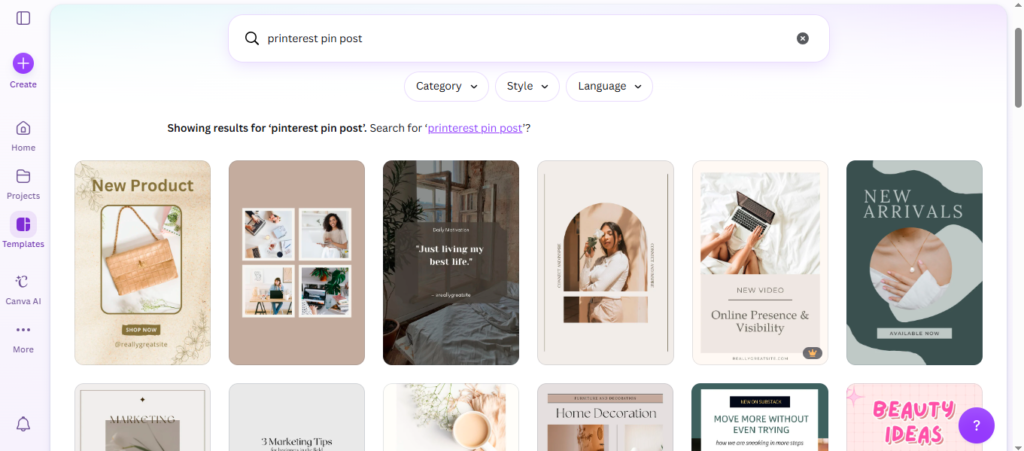
Step 1: Open Canva
Search for Pinterest pin templates.
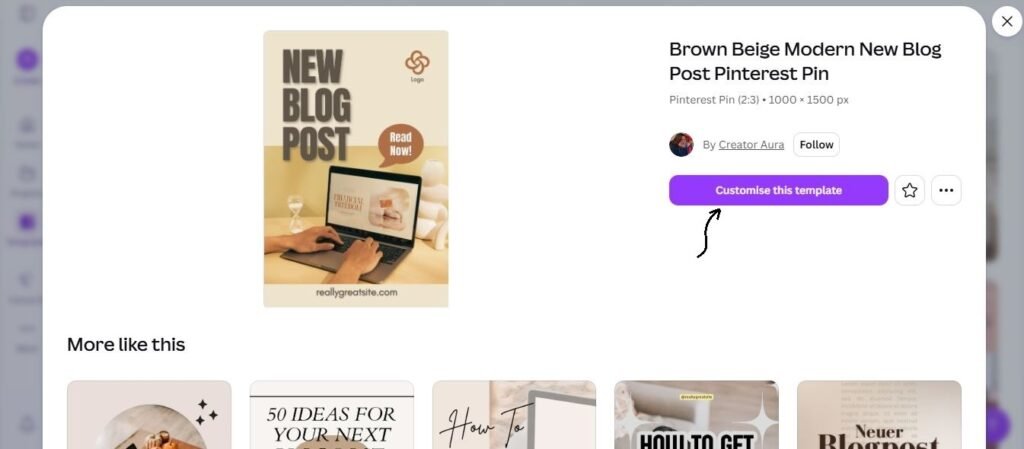
Step 2: Choose a Starting Layout
Pick a clean design that matches your niche.
Step 3: Add a Strong Headline
Your headline matters more than decorative elements.
Examples:
- 10 Budget Planner Ideas
- Easy Home Workout Routine
- Wedding Checklist You Need
- SEO Tips for Beginners
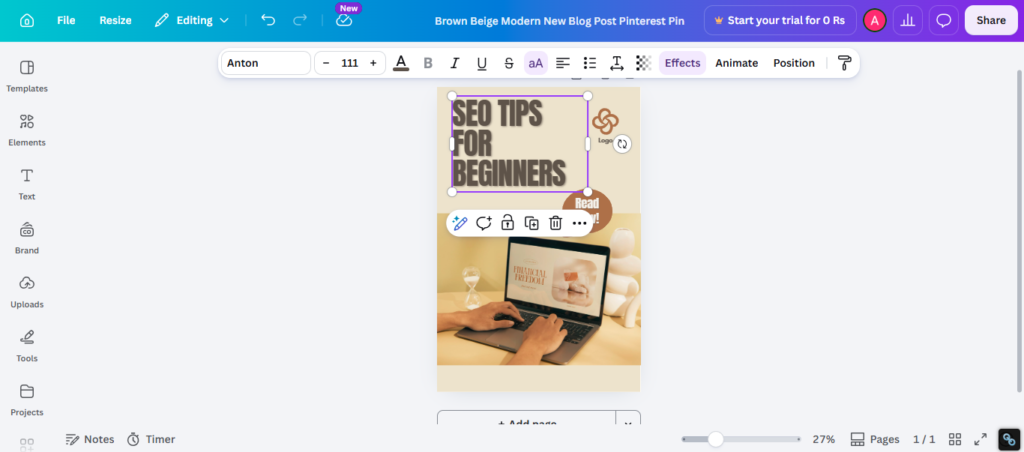
Step 4: Use Relevant Images
Choose photos or graphics connected to the topic.
Step 5: Add Branding
Use your colors, fonts, and style.
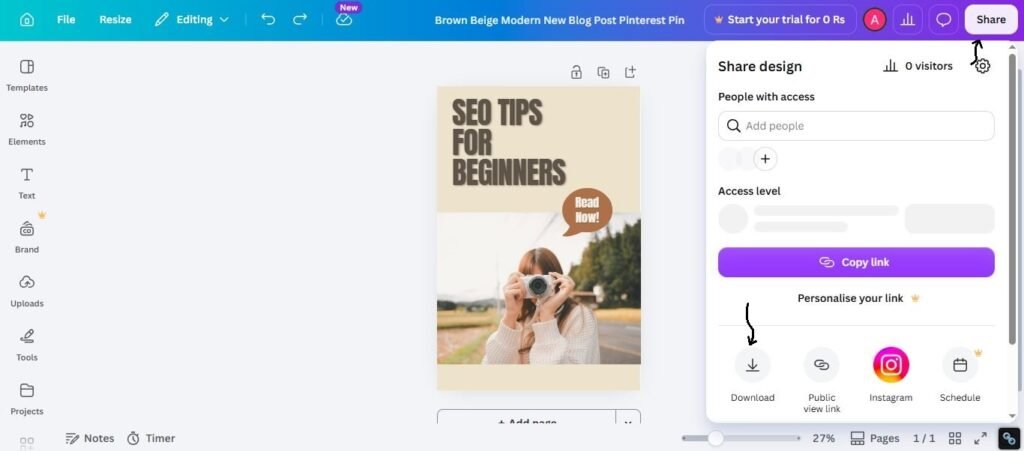
Step 6: Export High Quality
Use a sharp image format ready for upload.
Simple process. Strong potential.
The Best Pinterest Headline Formula
Most weak pins fail because the text says nothing useful.
Use this formula:
Benefit + Curiosity + Specific Topic
Examples:
- 7 Canva Hacks for Faster Designs
- Budget Planner Tips That Actually Work
- Beginner SEO Mistakes to Avoid
- Wedding Ideas Guests Will Love
People click when they see clear value.
Canva Pinterest Posts for Bloggers
If you write blog content, Pinterest can become a traffic source.
Smart Strategy:
Create multiple pins for one article.
Example blog post:
“Best Canva Fonts”
Make pins like:
- 15 Best Canva Fonts for Logos
- Canva Fonts You Should Try Today
- Free Canva Fonts for Elegant Designs
- Canva Font Ideas for Branding
One article should not rely on one pin only.
Canva Pinterest Posts for Etsy Sellers
Pinterest can help product discovery.
Great for:
- Printable planners
- Wedding templates
- Resume kits
- Wall art
- Social media packs
Use pins that show product value, not just the product file.
Example:
Instead of showing one planner page, show a styled desk mockup with benefits.
Canva Pinterest Posts for Affiliate Marketing
Pinterest users often search before buying.
Strong niches:
- Home decor
- Beauty
- Productivity
- Fitness
- Tech tools
- Fashion
- Business resources
Create helpful pins that lead to useful content, not spammy pages.
Pinterest SEO for Canva Posts
Pinterest does not only read images. It also uses text signals.
Use keywords in:
- Pin title
- Description
- Board names
- File naming habits
- Content topic relevance
Example keywords:
- canva pinterest post
- budget planner ideas
- wedding invitation tips
- beginner seo guide
Good design + good keywords = stronger chance of discovery.
Why You Should Create Multiple Pin Variations
Many creators make one pin and stop.
That limits growth.
Create multiple versions by changing:
- Headline
- Colors
- Main image
- Layout
- CTA
- Font style
Sometimes the second design beats the first easily.
Testing matters.
Common Canva Pinterest Mistakes
- Too much text
- Tiny unreadable fonts
- Weak headline
- Busy background
- No contrast
- Generic stock image
- No keywords
- One pin only
- Clickbait promise with weak content
- No brand consistency
Pretty but confusing pins often fail.
Best Niches for Canva Pinterest Posts
Strong Evergreen Niches
- Finance
- Health
- Career
- Productivity
- Recipes
- Parenting
- Home decor
- Education
Strong Business Niches
- Blogging
- SEO
- Marketing
- Ecommerce
- Templates
- Freelancing
Choose niches with repeat search demand.
Canva Templates vs Custom Designs
Templates
Best for speed and consistency.
Custom Designs
Best for unique branding and standing out.
Smart creators often start with templates, then customize heavily.
FAQs
Yes, especially for beginners and fast content creation.
Multiple variations usually give better chances than one pin.
Yes, Pinterest uses text relevance signals.
Yes, many sellers use it for extra discovery.
Templates are useful, but customization helps you stand out.
Expert Final Verdict
When you look at the final facts, a successful pin is not just a random graphic. It is a powerful traffic tool. When you design Canva Pinterest posts correctly, one single pin can keep working and bringing in views long after you create it. The creators who win on the platform are not always the best artists. They are simply the people who understand search intent, strong headlines, click psychology, consistent publishing, and testing. Beauty definitely helps, but a smart strategy is what actually wins!
If I were in your place, here are the steps I would take:
- Pick just one specific niche to focus on.
- Create 5 different pins for that one topic.
- Test different catchy headlines to see what works.
- Use your search keywords properly in the description.
- Improve the winning pins that get the most clicks.
- Stay completely consistent with your posting every week.
- Build a repeatable system that saves you time.
On Pinterest, just one good pin can open so many doors for your business!

I’m Faraz, the founder and lead content strategist at The Vistly. With a background in digital marketing, I lead content and design strategy for the site, working alongside a small team of designers to create practical Canva tutorials, font pairings, and design resources for creators, small businesses, and marketers around the world. My goal with The Vistly is to make professional-quality design accessible to anyone, no design degree required.