Best Sans Serif Fonts on Canva
When we make pictures for our business, we often think about what colors to use or which layout to choose. We move things around and try really hard, but the end result can still look a little plain, or like we did nothing. If you have a shop on Etsy, write a blog, or run a business, you know what I mean. The thing we often forget about is the way our text looks. A right font can make a big difference and make our pictures look really good with just one click.
I have tried a lot of fonts for Pinterest graphics,for projects I do for clients,blog thumbnails and for posts on social media. However, I always go back to the simple ones.Sans serif fonts, look really nice, feel modern, and people can read them really fast. If you want more people to look at your stuff and remember you, here is a list of the best sans serif fonts that you should start using on Canva today.
Quick Answer
The best sans serif fonts on Canva include Montserrat, Poppins, Open Sans, League Spartan, Nunito, Raleway, Lato, Public Sans, Oswald, and Quicksand. These fonts are popular because they are clean, readable, modern, and useful for many design styles.
If you want to explore more Canva font styles, these related guides can help you choose the right font for different design needs:
- Best Canva Font Pairings (Free Combinations That Actually Work)
- Best Aesthetic Canva Fonts (2026): Stylish Fonts for Beautiful Designs, Branding, and Social Media
- Best Canva Fonts for Logos
- Best Handwriting Fonts in Canva
- Best Cursive Fonts on Canva (2026): Elegant Script Fonts for Logos, Weddings, and Social Media
Best Fonts at a Glance
| Goal | Best Font |
| Best Overall | Montserrat |
| Best for Etsy | Poppins |
| Best for Pinterest | League Spartan |
| Best for Logo | Montserrat |
| Best for Luxury | Raleway |
| Best for Body Text | Open Sans |
What Are Sans Serif Fonts?
Sans serif fonts do not have small decorative strokes on letters. They look simple, modern, and easy to read.
They are commonly used for:
- Logos
- Social media posts
- Blog graphics
- Website text
- Presentations
- Product images
- Pinterest pins
If you want a clean and professional design, sans serif fonts are a smart choice.
Why Sans Serif Fonts Work So Well in Canva
Sans serif fonts perform well because they are clear on both desktop and mobile screens. This matters because many people view Canva designs on phones.
They also match many styles:
- Minimal brands
- Modern businesses
- Luxury brands
- Online stores
- Personal brands
- Educational content
A strong font can make even a simple design feel polished.
The Best Sans Serif Fonts on Canva
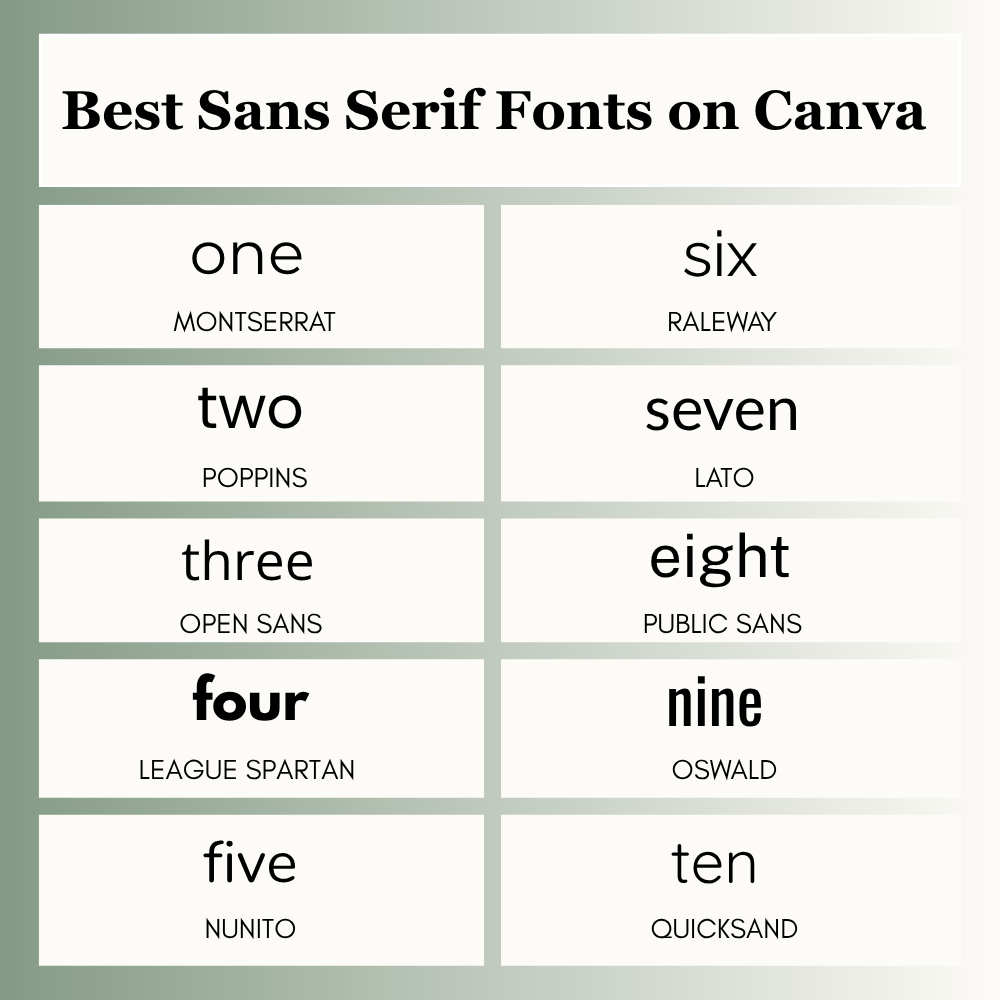
1. Montserrat
Montserrat is one of the most trusted Canva fonts. It looks bold, clean, and professional.
Best for: Logos, headings, brand graphics
2. Poppins
Poppins feels modern and friendly. It is great for digital products and social media designs.
Best for: Etsy listings, Instagram posts, website banners
3. Open Sans
Open Sans is highly readable, even at smaller sizes.
Best for: Body text, blog graphics, presentations
4. League Spartan
League Spartan is bold and attention-grabbing.
Best for: Pinterest titles, posters, bold branding
5. Nunito
Nunito has rounded letters and a soft feel.
Best for: Teachers, kids brands, lifestyle content
6. Raleway
Raleway looks elegant and premium.
Best for: Fashion brands, beauty designs, luxury content
7. Lato
Lato feels balanced and professional.
Best for: Business graphics, reports, website text
8. Public Sans
Public Sans is clean and modern with a simple style.
Best for: Corporate branding, clean layouts
9. Oswald
Oswald is narrow and bold, which helps when space is limited.
Best for: Headlines, ads, thumbnails
10. Quicksand
Quicksand feels playful and creative.
Best for: Fun brands, casual content, creative posts
Sans Serif Font Comparison Table
| Font | Style | Best Use |
| Montserrat | Bold Clean | Branding |
| Poppins | Friendly Modern | Etsy |
| Open Sans | Neutral Clear | Body Text |
| League Spartan | Strong Bold | |
| Raleway | Elegant | Luxury |
| Nunito | Soft Friendly | Education |
Best Canva Sans Serif Fonts by Use Case
| Use Case | Best Fonts |
| Logo Design | Montserrat, League Spartan |
| Etsy Listings | Poppins, Open Sans |
| Pinterest Pins | League Spartan, Oswald |
| Luxury Brand | Raleway, Montserrat |
| Body Text | Open Sans, Lato |
| Friendly Brand | Nunito, Quicksand |
Real User Scenarios
If You Sell on Etsy
Use clean fonts like Poppins so your product titles and images look clear and trustworthy.
If You Make Pinterest Pins
Use bold fonts like League Spartan or Oswald to catch attention fast.
If You Build a Brand
Use Montserrat or Raleway for a polished and professional look.
If You Create Worksheets or Slides
Use Nunito or Open Sans for easy reading.
Best Free Sans Serif Fonts in Canva
Many strong sans serif fonts are available in Canva free plans.
Popular free choices often include:
- Montserrat
- Open Sans
- Poppins
- Lato
- Oswald
Some font availability may change based on your Canva plan, region, or future updates. If you’re deciding whether premium features are worth paying for, compare Canva Free vs Pro before upgrading.
Best Canva Font Pairings
A smart font pairing can improve your design quickly.
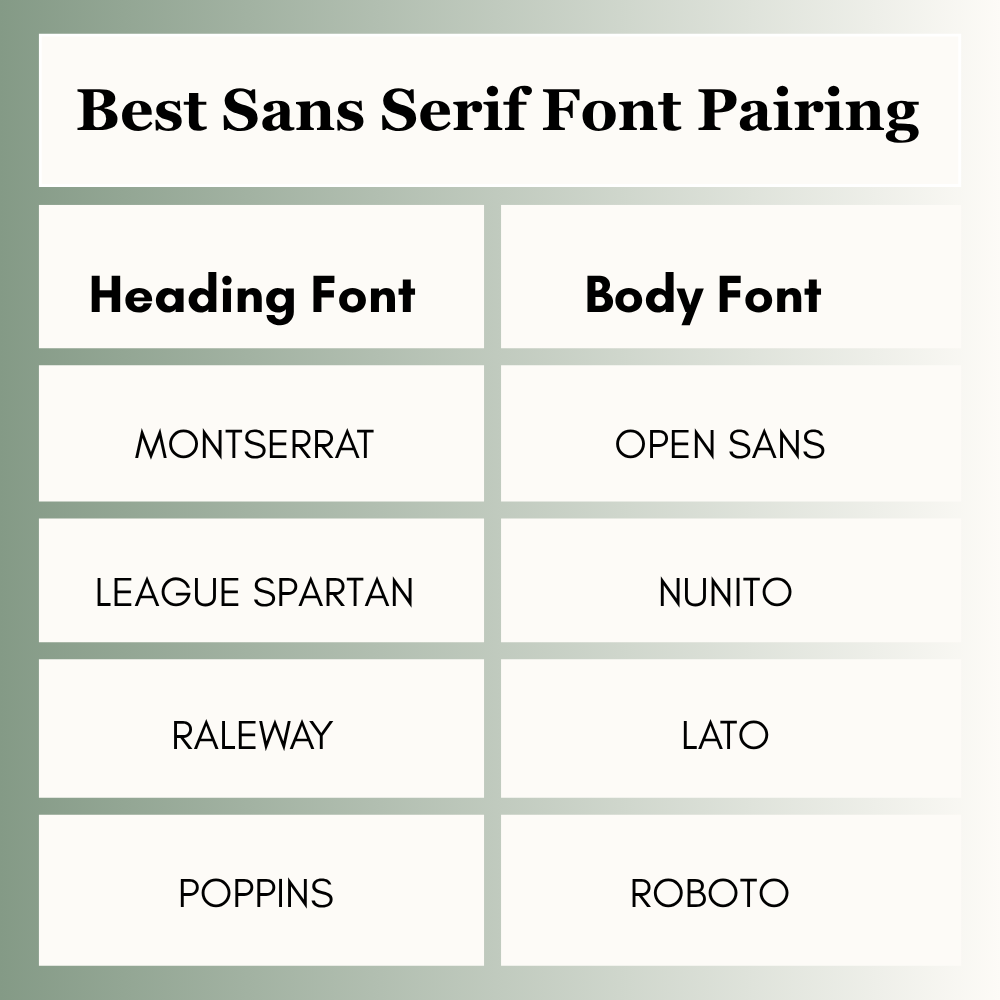
Use one font for titles and one for body text to keep designs clean.
Choose This Font If…
- Need bold headlines → League Spartan
- Need clear text → Open Sans
- Need modern shop style → Poppins
- Need premium branding → Raleway
- Need friendly style → Nunito
How to Choose the Right Sans Serif Font in Canva
Ask these questions before choosing:
Is it easy to read?
If users struggle to read it, choose another font.
Does it match your brand?
Luxury brands need elegance. Friendly brands need warmth.
Does it look good on mobile?
Always zoom out and test your design.
Does it pair well with another font?
Simple combinations usually work best.
How to Find Sans Serif Fonts in Canva
- Open your Canva design
- Click on text
- Open the font menu
- Search names like Montserrat or Poppins
- Test 2 to 3 options
- Pick the clearest one
Common Mistakes to Avoid
- Using too many fonts in one design
- Choosing thin fonts for mobile users
- Using all caps too often
- Poor line spacing
- Choosing style over readability
FAQs
Montserrat is one of the best all-around choices for most projects.
Montserrat and League Spartan are strong logo options.
Open Sans and Lato are great for readable body text.
Yes. Many modern brands and businesses use them.
Many fonts are free, but some may depend on your Canva plan.
Conclusion
I have worked a lot on Canva designs, and small updates can make a huge difference. To make your graphics look professional and clear, you need to choose the right sans-serif font.
Montserrat, Poppins, and Open Sans are great choices for Etsy products, Pinterest pins, and branding.
Don’t pick fonts randomly at the end. Choose fonts with purpose based on your goal:
- Use bold fonts when you need attention.
- Use clean fonts when readability matters.
- Use elegant fonts when you want a premium look.
Once you choose the right font, you will see a huge improvement in your Canva designs.

I’m Faraz, the founder and lead content strategist at The Vistly. With a background in digital marketing, I lead content and design strategy for the site, working alongside a small team of designers to create practical Canva tutorials, font pairings, and design resources for creators, small businesses, and marketers around the world. My goal with The Vistly is to make professional-quality design accessible to anyone, no design degree required.