Canva vs Adobe Illustrator (2026): Which One Is Better for Beginners, Freelancers & Professionals?
If you are trying to design anything online, it is easy to get confused by all the options. Most of the time, the big choice comes down to Canva and Adobe Illustrator. One of these apps lets everyday people drag and drop beautiful layouts together in just a few seconds. The other app takes much longer to learn, but it gives serious artists the power to build completely unique shapes from scratch.
After years of watching students, freelancers, and businesses use different tools, we know they are meant for completely different workflows. The real thing we need to figure out is: which one should you choose for Canva and Adobe Illustrator projects? This guide will give you an honest answer by breaking down real business needs, freelancer tips, and long-term value.
Quick Answer
Choose Canva if you want fast, easy, ready-made designs without a steep learning curve.
Choose Adobe Illustrator if you need professional vector design, custom logos, print files, brand identity systems, or advanced creative control. Example:
- Canva = Fast bike for city work
- Illustrator = Powerful car for long highway control
Both are useful. The right one depends on your destination.
If you’re choosing between Canva and Illustrator, these related guides can also help you explore Canva’s design options, branding, and creative tools:
- Best Canva Fonts for Logos
- Canva Pinterest Post (2026): How to Create Pins That Get Clicks, Saves, and Traffic
- Canva Free vs Pro (Honest Comparison for 2026)
- Best Canva Font Pairings (Free Combinations That Actually Work)
- Best Aesthetic Canva Font Combinations (Free Pairings That Actually Work)
Master Comparison Table
| Category | Canva | Adobe Illustrator | Best Choice |
| Ease of Use | Very Easy | Harder to Learn | Canva |
| Beginner Friendly | Excellent | Average | Canva |
| Templates | Huge Library | Limited Focus | Canva |
| Custom Design Freedom | Good | Excellent | Illustrator |
| Logo Design | Basic to Good | Professional | Illustrator |
| Social Media Content | Excellent | Good | Canva |
| Vector Graphics | Limited | Excellent | Illustrator |
| Branding Systems | Good | Excellent | Illustrator |
| Team Collaboration | Excellent | Good | Canva |
| Speed for Daily Work | Excellent | Moderate | Canva |
| Print Design | Good | Excellent | Illustrator |
| Learning Curve | Low | High | Canva |
| Career Value for Designers | Good | Excellent | Illustrator |
| Best for Agencies | Great for volume | Great for premium work | Depends |
| Overall Best for Most Users | Excellent | Strong Niche Power | Canva |
What Is Canva?
Canva is an online design platform focused on speed, ease, and ready-made creation.
You can make:
- Social media posts
- YouTube thumbnails
- Flyers
- Presentations
- Resumes
- Ads creatives
- Blog images
- Reels and videos
- Simple logos
- Business graphics
It is ideal for users who want results fast.
A shop owner, student, freelancer, or social media manager can start quickly without technical training.
What Is Adobe Illustrator?
Adobe Illustrator is a professional vector design software used by serious designers and creative professionals.
It is best for:
- Professional logos
- Scalable vector art
- Brand identity systems
- Packaging design
- Print-ready files
- Icons
- Typography design
- Custom illustrations
- Complex layouts
Illustrator gives deeper control, but it takes time to learn.
Main Difference Between Canva and Illustrator
The biggest difference is not features. It is workflow philosophy.
Canva Focuses On:
- Fast output
- Simplicity
- Templates
- Team content production
- Non-designers
Illustrator Focuses On:
- Precision
- Full creative freedom
- Professional design systems
- Technical control
- Experienced designers
One helps you create faster.
One helps you create deeper.
Canva vs Illustrator for Beginners
For beginners, Canva usually wins.
Why?
- Easy drag-and-drop editor
- No design experience required
- Ready-made templates
- Fast learning
- Less frustration
A beginner can make usable graphics in one day.
Illustrator can feel overwhelming at first because tools, layers, paths, anchors, and advanced controls need practice.
If confidence matters right now, Canva is the safer start.
Canva vs Illustrator for Freelancers
This depends on your service model.
Choose Canva If You Sell:
- Social media management
- Fast client posts
- Basic branding kits
- Marketing visuals
- Presentations
- Ebook covers
- Ads creatives
Choose Illustrator If You Sell:
- Premium logo design
- Brand identity packages
- Packaging
- Print graphics
- Custom illustrations
- High-end design retainers
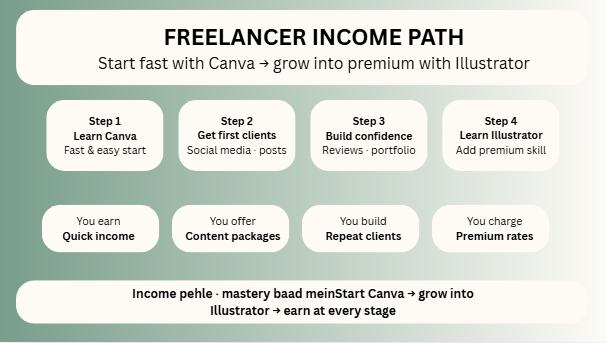
Lokk the thing is very simple
Fast delivery freelancer = Canva can make money quickly.
Premium designer freelancer = Illustrator can charge higher rates.
Canva vs Illustrator for Agencies
Agencies usually need both.
Canva Helps Agencies With:
- Daily post creation
- Team collaboration
- Fast approvals
- Reusable templates
- Bulk content systems
Illustrator Helps Agencies With:
- Client logo projects
- Premium branding
- Custom assets
- High-end print jobs
- Unique creative campaigns
If an agency only uses Illustrator, speed can drop.
If an agency only uses Canva, premium quality opportunities can be missed.
Best agencies mix both.
Canva vs Illustrator for Logo Design
If the logo is serious business branding, Illustrator wins clearly.
Why?
- True vector control
- Clean scaling
- Precision shapes
- Better typography handling
- Export flexibility
Canva can make simple logos, but complex or premium identity work is not its strongest area.
A wedding invitation logo and a startup brand identity are not the same thing.
Canva vs Illustrator for Social Media
Canva dominates here for most users.
Reasons:
- Platform-ready sizes
- Fast templates
- Quick edits
- Easy scheduling ecosystem
- Team-friendly workflow
Illustrator can make amazing social graphics, but for daily content calendars, Canva is usually faster.
Canva vs Illustrator for SEO Bloggers
For bloggers and affiliate sites, Canva is often more practical.
Use it for:
- Featured images
- Pinterest pins
- Comparison charts
- Infographics
- Lead magnets
- Downloadable PDFs
Visual speed matters in content publishing.
If you need custom illustrations for a unique brand, then Illustrator becomes valuable.
Pricing and Value
Canva offers a strong free version and affordable upgrade paths for many users.
Adobe Illustrator is part of the Adobe ecosystem and often costs more, but the value can be worth it for professional designers earning from advanced work.
Simple rule:
- Lower budget + fast needs = Canva
- Higher budget + premium design income = Illustrator
Learning Curve Reality
This is where many articles stay too polite.
Canva Learning Curve
Low. Most people can start quickly.
Illustrator Learning Curve
Higher. You may need tutorials, practice, and patience.
That is not a weakness. It is the price of power.
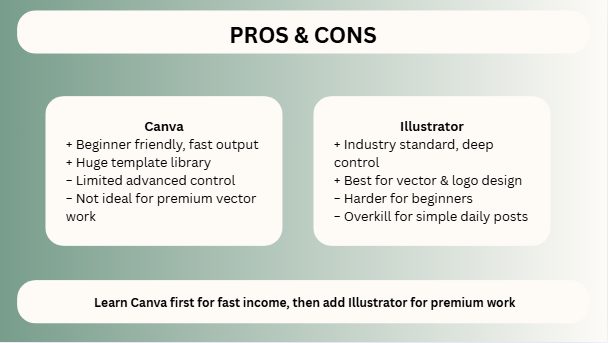
Pros of Canva
- Very beginner friendly
- Fast content production
- Huge template library
- Great for teams
- Strong free version
- Excellent for marketing assets
- Saves time daily
Cons of Canva
- Limited advanced control
- Some designs feel template-based
- Not ideal for premium vector work
- Unique branding takes more effort
Pros of Illustrator
- Industry standard tool
- Best for vector design
- Excellent logo creation
- Strong print workflow
- Deep creative control
- Great long-term career skill
Cons of Illustrator
- Harder for beginners
- Higher learning time
- More expensive for casual users
- Overkill for simple daily posts
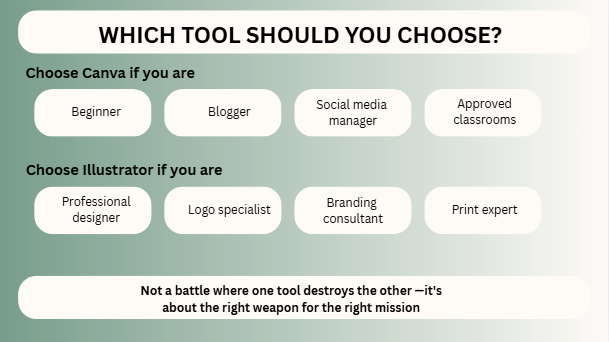
Which Tool Should You Choose?
Choose Canva If You Are:
- Beginner
- Freelancer doing quick jobs
- Agency managing daily content
- Student
- Blogger
- Small business owner
- Social media manager
Choose Illustrator If You Are:
- Professional designer
- Logo specialist
- Branding consultant
- Packaging designer
- Print expert
- Creative agency premium designer
Smart Strategy (Best of Both Worlds)
A smart creator often uses both:
- Canva for speed
- Illustrator for precision
That combination can be powerful.
FAQs
For beginners and speed, yes. For advanced professional design, no.
For many casual users, yes. For serious vector professionals, not fully.
Yes, especially if you want a design career or premium clients.
They can, but adding Illustrator expands service quality.
Fast content services = Canva
Premium branding services = Illustrator
Expert Final Verdict
Canva and Illustrator are both amazing, but they are meant for different goals. Canva helps you get things done quickly without any stress. Illustrator gives you the power to create professional art from scratch. The most practical path is to start with Canva, find some clients, and see how fun designing can be. As you grow, you can start learning Illustrator to offer even better services.
Remember: make your work easy at the start, and build up your skills over time!

I’m Faraz, the founder and lead content strategist at The Vistly. With a background in digital marketing, I lead content and design strategy for the site, working alongside a small team of designers to create practical Canva tutorials, font pairings, and design resources for creators, small businesses, and marketers around the world. My goal with The Vistly is to make professional-quality design accessible to anyone, no design degree required.