Canva Free vs Pro (Honest Comparison for 2026)
Choosing between Canva Free vs Pro sounds easy until you actually start making your designs. Many people begin with the free account, but they quickly hit a wall when they need the coolest templates, faster shortcuts, or the magic background remover tool. Other people buy the paid version too early and end up wasting money on fancy features they never use. The real question is not just about the price—it is about deciding which version fits your actual goals.
After making tons of graphics, one thing is completely clear: the best choice depends on how much you edit and how valuable your time is. Let’s look at Canva Free vs Pro honestly by breaking down the good parts, the bad parts, and exactly who should spend money on which option.
Quick Answer
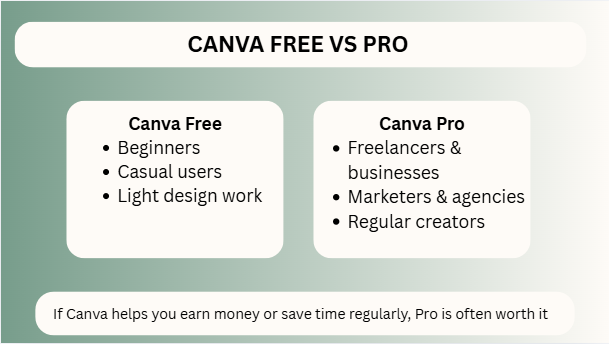
Canva Free is best for beginners, casual users, and light design work. Canva Pro is better for freelancers, businesses, marketers, agencies, and creators who need premium assets, faster workflows, AI tools, brand kits, and advanced features. If Canva helps you earn money or save time regularly, Pro is often worth it. If you’re exploring Canva tools and design ideas, these related guides can help you get more from the platform:
- How to Make Background Transparent in Canva (Fast & Easy Guide for 2026)
- How to Change Page Orientation in Canva (Fast & Easy Guide for 2026)
- Best Canva Font Pairings (Free Combinations That Actually Work)
- How Much Is Canva Pro? (Honest Pricing Guide for 2026)
- How to Sell Canva Templates on Etsy (2026): Beginner Guide to Real Income
Canva Free vs Pro Comparison Table
| Feature | Canva Free | Canva Pro | Best For |
| Price | Free | Paid Monthly / Yearly | Budget users vs professionals |
| Templates | Basic library | Premium library | Faster polished designs |
| Photos & Elements | Limited free assets | Huge premium library | Content creators |
| Brand Kit | Limited | Full access | Agencies & businesses |
| Background Remover | No / Limited | Yes | Ecommerce & marketers |
| Magic Resize | No | Yes | Social media managers |
| AI Tools | Limited | Expanded access | Productivity |
| Storage | Basic | Higher | Heavy users |
| Bulk Create | Limited | Better workflow | Teams & scaling |
| Best User | Beginners | Professionals | Depends on need |
What Is Canva Free?
Canva Free gives you enough tools to start designing without paying.
Best For:
- Beginners
- Students
- Personal projects
- Basic social media posts
- Quick presentations
- Occasional designs
Why It Works:
You can learn the platform, build simple graphics, and test ideas without spending money.
For many users, this is the smartest place to begin.
What Is Canva Pro?
Canva Pro is the paid version built for people who create more often and need faster results.
Best For:
- Freelancers
- Agencies
- Ecommerce sellers
- Content creators
- Small businesses
- Marketing teams
Why It Helps:
It reduces manual work, unlocks premium assets, and improves consistency.
When time matters, Pro becomes more valuable.
Canva Free vs Pro: Biggest Differences
These are the features users notice most.
1. Premium Templates
Free users get good options, but Pro users unlock a much larger library.
Useful when you need faster client-ready designs.
2. Background Remover
One of the most valuable Pro tools is the background remover.
Great for:
- Product photos
- Headshots
- Thumbnails
- Ads
This alone can save serious time.
3. Magic Resize
Turn one design into multiple platform sizes quickly.
Example:
- Instagram post
- Story
- Facebook banner
- Pinterest pin
Without rebuilding everything manually.
4. Brand Kit
Store logos, colors, fonts, and brand assets.
Perfect for agencies and businesses handling multiple brands.
5. AI Tools
Helpful for content ideas, quick edits, and design assistance.
Canva Free vs Pro for Freelancers
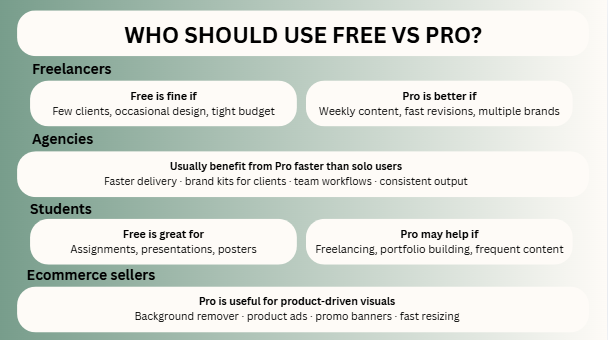
If you create client work, time becomes money.
Free Is Fine If:
- You have very few clients
- You design occasionally
- Budget is tight
- You are still learning
Pro Is Better If:
- You create weekly content
- Clients want fast revisions
- You need premium templates
- You manage multiple brands
One client can often cover the monthly cost.
Canva Free vs Pro for Agencies
Agencies usually benefit from Pro faster than solo users.
Why Pro Helps:
- Faster delivery
- Brand kits for clients
- Easier team workflows
- Better asset library
- More consistent output
If you run an agency, efficiency matters more than subscription cost.
Canva Free vs Pro for Students
Students should start based on need.
Free Is Great For:
- Assignments
- Presentations
- Notes
- Posters
- Class projects
Pro May Help If:
- You freelance on the side
- You build a portfolio
- You create content often
- You need premium visuals
Canva Free vs Pro for Ecommerce
Product visuals directly affect sales.
Pro Is Useful For:
- Background remover
- Product ads
- Promo banners
- Fast resizing
- Bulk content creation
If visuals help sell products, better tools can pay for themselves.
Who Should Stay on Canva Free?
Stay on Free if:
- You design once in a while
- You are learning Canva
- You do not need premium assets
- You are testing ideas
- Budget matters most right now
There is no shame in starting free.
Who Should Upgrade to Canva Pro?
Upgrade if:
- Canva is part of your business
- You create content regularly
- You waste time doing manual edits
- You need consistent branding
- You want faster output
The right tool is not an expense when it saves paid hours.
Common Problems and Honest Truths
“I Bought Pro But Don’t Use It”
If you design rarely, downgrade and save money.
“Free Feels Limiting”
That usually happens when your workload grows.
“Do I Need Pro to Succeed?”
No. Skill matters more than tools. But tools can speed up skill execution.
“Is Pro Too Expensive?”
Depends on whether Canva is a hobby or part of income generation.
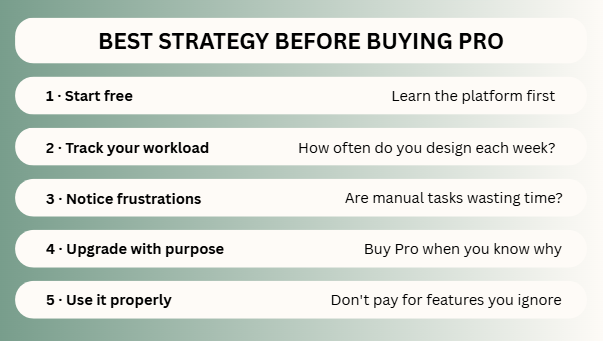
Expert Tip
After testing Canva Free and Pro for client work, agency systems, thumbnails, lead magnets, and ecommerce creatives, I have found that many users ask the wrong question. They ask, “Is Pro worth it?” The better question is, “What is my time worth?”
If Pro saves you even one hour a week, it may already justify itself.
If you are unsure where to start, use:
- Free for learning
- Pro for earning
- Free for casual use
- Pro for scaling
- Upgrade only when pain points are real
That framework works in many real situations.
Frequently Asked Questions
Free offers core tools. Pro adds premium assets, advanced features, AI tools, and faster workflows.
For freelancers, marketers, businesses, and regular creators, often yes.
Yes, especially when starting out. Many people do.
Not always. Free is enough for many academic needs.
Usually Pro, because speed and brand control matter.
Final Thoughts
Deciding on Canva Free vs Pro really depends on your goals. The free account is perfect if you are just practicing or working on occasional school projects. However, if you are trying to make real money, manage a business page, or create tons of digital files every week, the Pro plan is definitely worth considering because of how much faster it lets you work.
From real experience, you get the best results when you match the tool to your actual needs. Keep track of your daily work, look at your spending money, and value your own time. Fancy updates come and go, but being smart with your tools never goes out of fashion.

I’m Faraz, the founder and lead content strategist at The Vistly. With a background in digital marketing, I lead content and design strategy for the site, working alongside a small team of designers to create practical Canva tutorials, font pairings, and design resources for creators, small businesses, and marketers around the world. My goal with The Vistly is to make professional-quality design accessible to anyone, no design degree required.