Best Canva Fonts for Quotes
You’ve found the perfect quote. It’s deep, meaningful, and you just know your audience will love it. But the moment you type it into Canva, it looks totally flat. Either it looks too basic, or it’s just really hard to read. If you’re trying to sell prints on Etsy or get people to stop scrolling on Instagram, you know exactly how annoying this is. Canva has thousands of fonts, but instead of helping, it just leaves you confused.
The trick isn’t about searching for the “prettiest” font. It’s simply about matching the font style to the actual mood of your words. For example, a heavy gym motivation quote should never look like a soft wedding invitation. In this guide, we are skipping the boring, repetitive advice. Instead, you’ll learn exactly how to pick fonts that make your quotes look professional and easy to read in seconds.
If you want to explore more Canva font styles and combinations, these related guides can help you choose the right typography for your quote designs:
- Best Sans Serif Fonts on Canva
- Best Serif Fonts on Canva
- Best Handwriting Fonts in Canva
- Best Canva Font Pairings (Free Combinations That Actually Work)
Quick Look: Best Canva Fonts for Quotes
| Quote Style | Best Canva Fonts | Availability | Best For |
| Motivational | Anton, Bebas Neue | Free | Bold quote posts |
| Elegant | Playfair Display, Cinzel | Free / Varies | Luxury quotes |
| Handwritten | Parisienne, Great Vibes | Free / Varies | Personal quotes |
| Minimal | Montserrat, Poppins | Free | Clean quote graphics |
| Friendly | Fredoka, Baloo | Free | Fun quotes |
| Aesthetic | DM Serif Display, Raleway | Free / Varies | Pinterest posts |
| Custom Brand Style | Uploaded Custom Fonts | Paid (Canva Pro) | Unique branded quotes |
NOTE:Font availability can change over time based on Canva updates, region, account type, or subscription plan. Always check inside your Canva editor.
Why Fonts Matter in Quote Design
A quote is not only about words. Presentation also matters.
- Bold fonts feel powerful
- Serif fonts feel elegant
- Script fonts feel personal
- Clean fonts feel modern
- Rounded fonts feel friendly
The right font helps people notice and connect with your message faster.
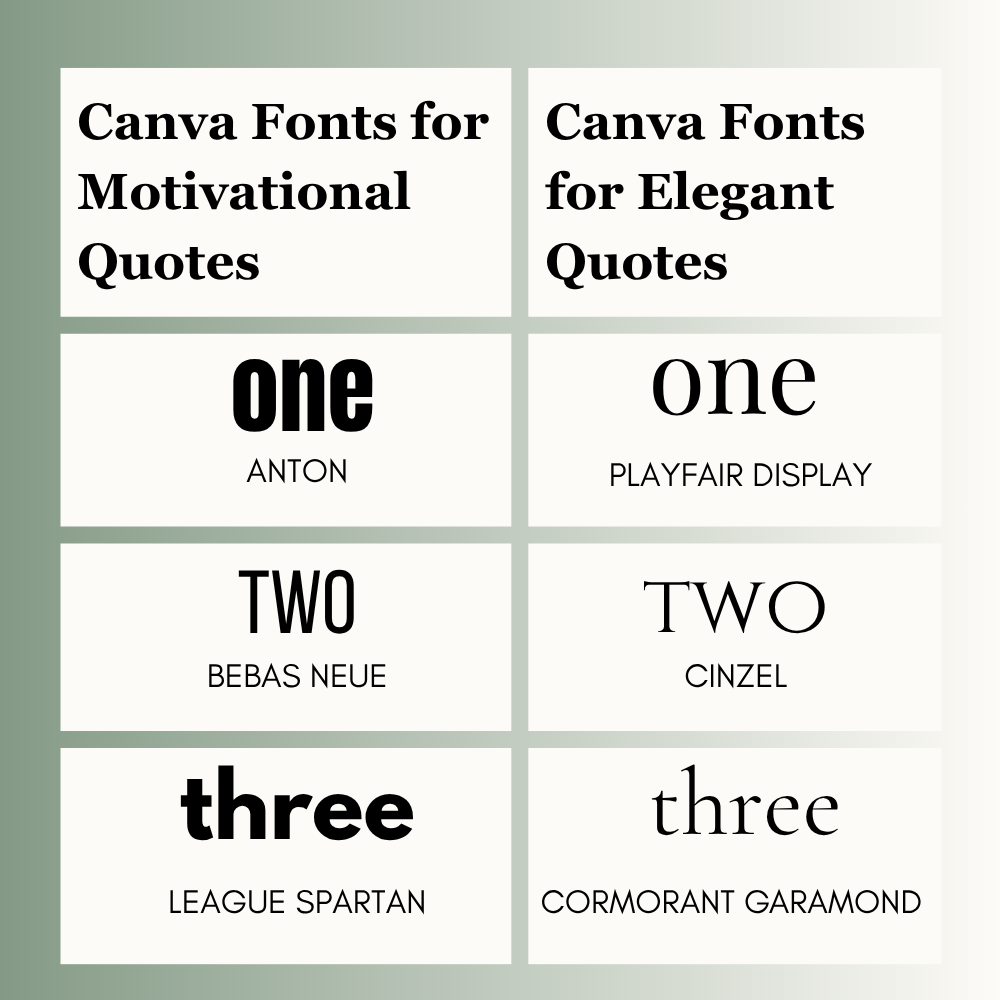
Best Canva Fonts for Motivational Quotes
Use strong fonts when you want energy and impact.
- Anton is bold and powerful.
- Bebas Neue grabs attention quickly.
- League Spartan feels strong and modern.
Best for success, gym, hustle, and confidence quotes.
Best Canva Fonts for Elegant Quotes
Use elegant fonts for beauty, lifestyle, wedding, and premium designs.
- Playfair Display looks classy and refined.
- Cinzel feels premium and timeless.
- Cormorant Garamond adds a luxury touch.
Great for sophisticated quote posts.
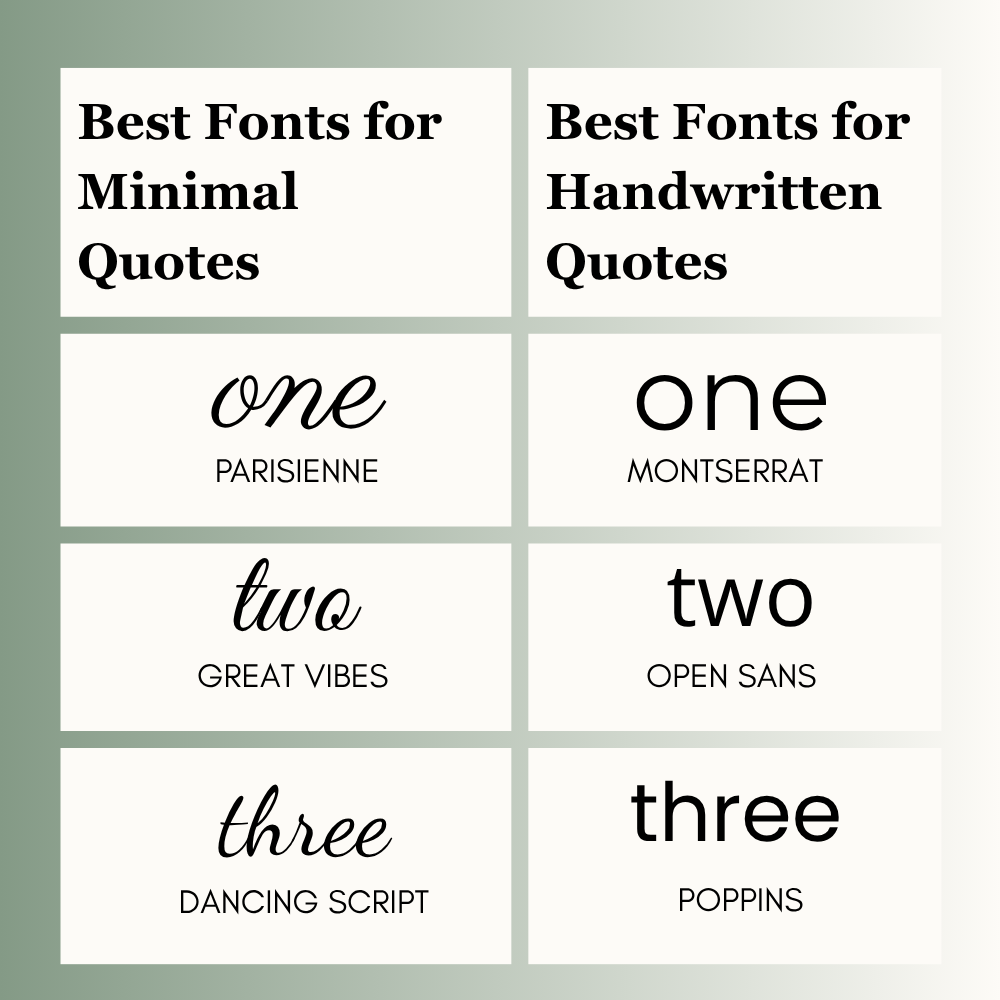
Best Canva Fonts for Minimal Quotes
Simple fonts work well for clean layouts and modern brands.
- Montserrat is clean and professional.
- Poppins feels fresh and modern.
- Open Sans is clear and readable.
Best for Instagram, business pages, and creators.
Best Canva Fonts for Handwritten Quotes
These fonts feel warm and personal.
- Parisienne is stylish and soft.
- Great Vibes feels graceful.
- Dancing Script looks natural and human.
Best for emotional, wedding, and personal quotes.
Best Canva Fonts for Quotes by Platform
Different platforms need different styles.
Instagram Quotes
Use bold and readable fonts like Anton or Montserrat.
Pinterest Quotes
Use aesthetic fonts like Playfair Display or DM Serif Display.
Story Quotes
Use large clean fonts like Poppins or Open Sans.
LinkedIn Quotes
Use professional fonts like Montserrat or Open Sans.
Best Canva Font Pairings for Quotes
Using two fonts can improve your design when done correctly.
- Playfair Display + Montserrat
- Anton + Open Sans
- Parisienne + Lato
- DM Serif Display + Poppins
Use one font for the main quote and another for the author name or small text.
Best Fonts by Quote Mood
Sometimes the same quote feels different with a new font.
- Motivational = Anton
- Calm = Raleway
- Romantic = Great Vibes
- Luxury = Playfair Display
- Friendly = Fredoka
- Inspirational = Poppins
Choose based on emotion and audience.
Best Fonts for Different Creators
Different creators need different quote styles.
- Coach = Anton
- Blogger = Playfair Display
- Teacher = Poppins
- Etsy Seller = DM Serif Display
- Wedding Brand = Great Vibes
- Fitness Page = League Spartan
- Personal Brand = Montserrat
- Islamic Quote Page = Cinzel or Poppins
Choose fonts that match your niche and audience expectations.
How to Choose the Right Canva Font for Quotes
Follow these steps:
- Match the font with the quote mood
- Keep it easy to read
- Use only 1 or 2 fonts
- Test on mobile
- Keep enough spacing
- Use contrast colors
- Think about your audience
Simple quote designs often perform better than busy layouts.
Before Posting Your Quote, Check This
Use this checklist before publishing:
- Easy to read in 2 seconds?
- Clear on mobile screen?
- Good text contrast?
- Enough spacing between lines?
- Only one or two fonts used?
- Background clean and not distracting?
Small changes can improve results.
Common Quote Font Mistakes to Avoid
Many beginners make these mistakes:
- Using hard-to-read script fonts
- Adding too many fonts
- Using tiny text
- Low contrast colors
- Using the same font every time
- Busy background with weak text
- Choosing a font that does not match the message
Avoid these mistakes for better results.
Trending Canva Fonts for Quotes This Year
Popular styles change, but readable fonts stay strong.
- Poppins
- Montserrat
- DM Serif Display
- Playfair Display
- League Spartan
- Raleway
If you want a fresh look, start with these options.
Need a Unique Style?
If common Canva fonts feel overused, Canva Pro allows custom font uploads. This can help create a unique quote style for your brand.
Useful for creators, agencies, Etsy sellers, and businesses.
FAQ
Montserrat is one of the best all-around Canva fonts for quotes because it is clean and readable.
Playfair Display, DM Serif Display, and Raleway look aesthetic.
Poppins, Anton, Montserrat, and Open Sans are great free options.
Use one or two fonts for a clean and professional look.
Conclusion
Let’s simplify this. You don’t need to scroll through Canva for hours. Just follow these three rules:
- Match the energy: If your quote is loud and motivational, use a thick, bold font. If it’s emotional or calm, go for something thin and elegant.
- Readability is everything: If people have to squint to read your post while scrolling, they will just move past it. Fancy fonts look nice, but clean fonts actually get shared.
- Stick to what works: When you’re completely stuck, grab something safe like Poppins or Montserrat for modern posts, Anton for big bold statements, or Playfair Display for a classic vibe.
Don’t overcomplicate your graphics with heavy effects. Just put the text out there, check how it looks on your mobile screen, and if it’s easy to read, you’re good to go.

I’m Faraz, the founder and lead content strategist at The Vistly. With a background in digital marketing, I lead content and design strategy for the site, working alongside a small team of designers to create practical Canva tutorials, font pairings, and design resources for creators, small businesses, and marketers around the world. My goal with The Vistly is to make professional-quality design accessible to anyone, no design degree required.