Best Bold Fonts on Canva
Let’s talk about a quick trick that changes everything in graphic design: bold fonts. A lot of beginners and business owners think they need complex layouts to look professional. But honestly, the real secret is how you display your words. Weak text makes even the prettiest design look forgettable, which means fewer clicks and less attention for your brand.
Before you delete your draft and start over, try changing your main text to a strong, heavy font. It instantly adds confidence and clarity to your graphics. Using bold fonts in Canva is the best option to make your key points pop and keep your audience engaged.In this guide, I will show you exactly which bold fonts to pick for the best results.
Quick Answer
The best bold fonts on Canva include Anton, League Spartan, Rubik One, Chunk Five, Alfa Slab One, Lovelo, and Limelight. These fonts work well for thumbnails, posters, logos, branding, and social media graphics because they are strong, clear, and easy to notice. Some are available on the free plan, while others may require Canva Pro.If you’re unsure which features and fonts are included in each plan, check our guide to Canva Free vs Pro before choosing your fonts.
What Are Bold Fonts in Canva?
Bold fonts have thicker letters and stronger shapes. They are designed to stand out. They are useful when you want people to notice your message quickly.
Bold fonts are often used for:
- Headlines
- Posters
- Logos
- Sales graphics
- YouTube thumbnails
- Instagram posts
- Event banners
Why Use Bold Fonts on Canva?
Bold fonts can make your design feel:
- Strong
- Modern
- Clear
- Energetic
- Confident
- Easy to notice
They are helpful when your message needs fast attention.
Best Bold Fonts on Canva at a Glance
| Font | Plan | Best For | Style | Easy to Read |
| Anton | Free | Thumbnails, Headlines | Strong, Direct | Yes |
| League Spartan | Free | Branding, Websites | Modern, Clean | Yes |
| Rubik One | Free | Promotions, Social Posts | Fun, Energetic | Medium |
| Chunk Five | Free | Sales Graphics, Posters | Heavy, Loud | Medium |
| Alfa Slab One | Usually Free | Logos, Product Designs | Bold, Classic | Yes |
| Lovelo | Often Pro / Limited | Premium Branding | Stylish, Premium | Yes |
| Limelight | Free | Retro, Creative Designs | Creative, Vintage | Medium |
NOTE:Availability can change based on Canva updates, plan type, and account access.
Free vs Paid: Which Plan Is Better?
If you design only sometimes, the free Canva plan is often enough and includes many useful bold fonts. If you create client work, business branding, or daily content, Canva Pro can save time with more font options, brand tools, and premium assets.
Best Bold Font Pairings
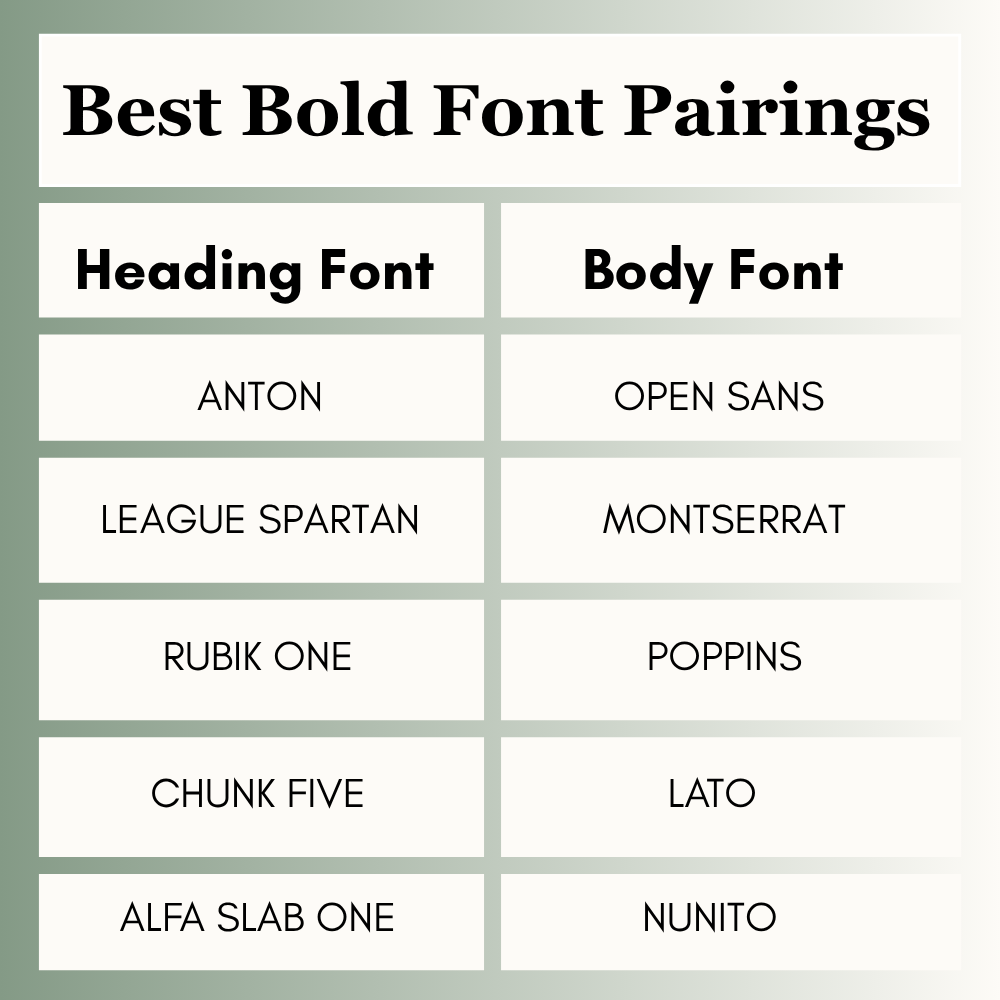
Use one bold font for headings and a simple font for body text.
- Anton + Open Sans
- League Spartan + Montserrat
- Rubik One + Poppins
- Chunk Five + Lato
- Alfa Slab One + Nunito
How to Find Bold Fonts in Canva
Follow these steps:
- Open Canva
- Add a text box
- Click the font menu
- Search for a font name
- Test 2 to 3 options
- Check mobile view before saving
Bold vs Regular Fonts
- Bold Fonts: Better for headlines, ads, short text, and strong messages
- Regular Fonts: Better for paragraphs, body text, and longer reading sections
Use both styles together for balance.
Readability vs Style
Choose readable fonts like Anton, League Spartan, or Lovelo when clarity matters most. Choose stylish fonts like Limelight, Rubik One, or Chunk Five when visual personality matters more.
Common Mistakes to Avoid
Many beginners make these mistakes:
- Using bold font for every line
- Using hard-to-read fonts
- Using too many fonts
- Ignoring spacing
- Not checking mobile view
Keep your design clean and easy to read.
Quick Tips for Better Results
- Use bold fonts for headlines
- Keep body text simple
- Use only 2 fonts in one design
- Add spacing around text
- Match the font to your brand style
Frequently Asked Questions
Anton is one of the most popular bold fonts on Canva for strong headlines and thumbnails.
Yes, many bold fonts work well for logos that need a strong and clear identity.
League Spartan and Anton are strong choices for clear text.
Some bold fonts are free, while others may depend on your Canva plan or account access.
Usually no. Bold fonts work best for headings, short text, and key messages.
Explore More Canva Font Guides
- Best Serif Fonts on Canva
- Best Cute Canva Fonts (2026): Playful, Pretty, and Stylish Fonts for Better Designs
- Best Aesthetic Canva Fonts (2026): Stylish Fonts for Beautiful Designs, Branding, and Social Media
Conclusion
Not all bold fonts do the same job, so choose them based on what you are making. If you need something that pops on thumbnails or main titles, Anton and League Spartan are super popular. For a fun sales graphic, Chunk Five or Rubik One are perfect. And if you want your brand to look stylish, Lovelo or Alfa Slab One might be the best fit.
A quick tip from my side: you don’t need to put bold text everywhere. Just use it on the words you want people to notice first. Always check your design on your mobile phone to ensure it is readable, and don’t crowd the page. A clean design with the right font will always bring better results.

I’m Faraz, the founder and lead content strategist at The Vistly. With a background in digital marketing, I lead content and design strategy for the site, working alongside a small team of designers to create practical Canva tutorials, font pairings, and design resources for creators, small businesses, and marketers around the world. My goal with The Vistly is to make professional-quality design accessible to anyone, no design degree required.