How Much Is Canva Pro? (Honest Pricing Guide for 2026)
Learning how much Canva Pro costs sounds like a simple pricing question, but most users are really trying to make a big decision. They are asking whether the monthly plan is better than the yearly one, if the upgrade is worth paying for, or if the free plan is already enough for their projects. This topic is not just about the money—it is about the real value you get!
After using Canva for client work, store designs, thumbnails, and business projects, one thing becomes clear fast: the right plan depends on how often you create and how valuable your time is. This guide explains the pricing clearly so you can choose the best option.
Quick Answer
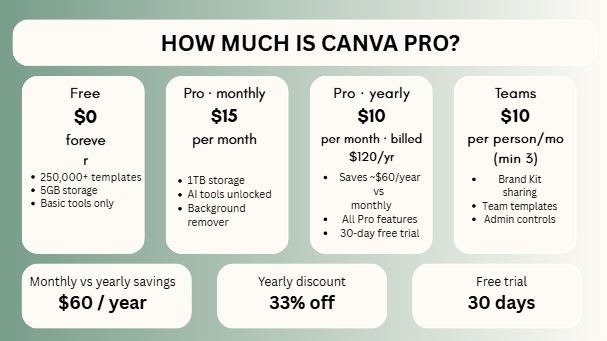
Canva Pro commonly costs around $15 per month on monthly billing or $120 per year on annual billing (USD reference), but exact pricing can vary by country, currency, taxes, promotions, and account region. Annual plans usually offer better value than paying month to month.
If you’re deciding whether Canva Pro is worth the cost, these related guides can help you compare plans, understand Canva’s features, and choose the right option for your needs:
- Canva for Educators Free (2026): Full Guide for Teachers, Schools, and Students
- How to Create Mockups for Etsy (2026): Beginner Guide to More Clicks and Sales
- Can I Use Canva Pro Elements to Sell on Etsy? (2026 Honest Guide)
- Best Canva Font Pairings (Free Combinations That Actually Work)
- How to Make Background Transparent in Canva (Fast & Easy Guide for 2026)
Canva Pricing Comparison Table
| Plan | Typical Price | Best For | Key Note |
| Canva Free | $0 | Beginners | Great for learning |
| Canva Pro Monthly | ~$15/month | Flexible users | Cancel anytime |
| Canva Pro Yearly | ~$120/year | Regular users | Better long-term value |
| Canva Teams | Varies by seats | Agencies & teams | Collaboration focused |
| Education / Nonprofit | Eligible free access | Qualified users | Conditions apply |
What Is Canva Pro?
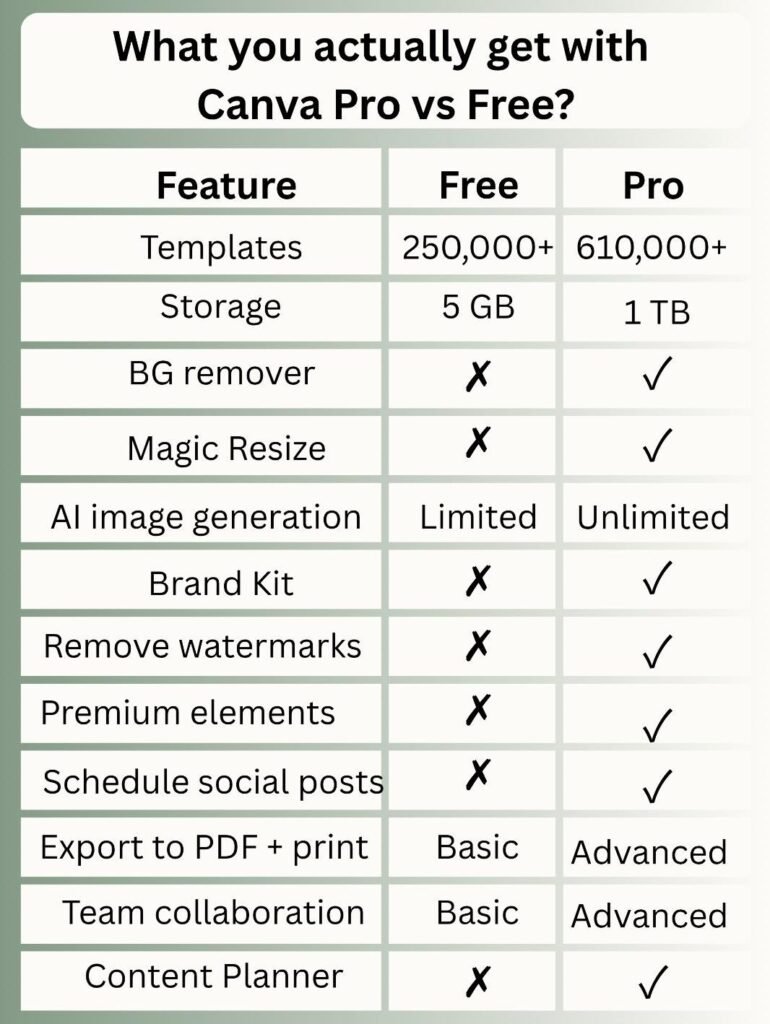
Canva Pro is the paid version of Canva built for users who need more speed, more assets, and better workflow tools.
Popular Features:
- Premium templates
- Premium photos and elements
- Background remover
- Magic Resize
- Brand Kit
- AI tools
- Larger storage
- Faster content workflows
For casual users, some of these may feel optional. For professionals, they can feel essential.
How Much Is Canva Pro Per Month?
The monthly option is commonly around $15/month depending on region and taxes.
Best For:
- New users testing Pro
- Freelancers with changing workload
- Short-term projects
- Users who want flexibility
Good Side:
You can cancel anytime.
Watch Out:
Paying monthly for a full year usually costs more than annual billing.
How Much Is Canva Pro Per Year?
The yearly option is commonly around $120/year depending on country and billing setup.
Best For:
- Regular creators
- Businesses
- Agencies
- Ecommerce sellers
- Long-term users
Why Many Users Prefer It:
Lower yearly cost compared to 12 monthly payments.
If you already use Canva often, yearly plans usually make more sense.
Monthly vs Yearly: Which Is Better?
This depends on your situation.
Choose Monthly If:
- You are still testing Canva
- You only need it temporarily
- Budget changes month to month
- You want flexibility first
Choose Yearly If:
- You create content regularly
- Canva is part of your business
- You already know you need Pro
- You want better value
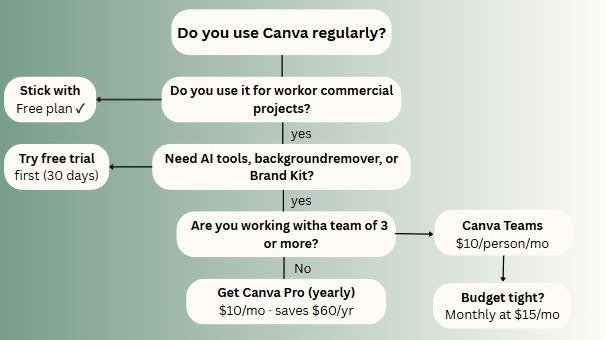
Is Canva Pro Worth It?
This is the real question behind the keyword.
Usually Yes If You Need:
- Faster design work
- Better templates
- Premium visuals
- Brand consistency
- Bulk content creation
- Less manual editing
Maybe No If:
- You design once in a while
- Free tools already meet your needs
- You are still learning basics
- You rarely use advanced features
Worth depends on usage, not hype.
Canva Pro for Freelancers
If you serve clients, speed matters.
Why It Helps:
- Faster revisions
- Better templates
- Quick resizing
- Stronger presentations
- Easier branding
One paid client can often cover the subscription.
Canva Pro for Agencies
Agencies usually benefit the most.
Why Agencies Upgrade Fast:
- Team collaboration
- Brand kits for clients
- Faster production
- Better consistency
- More scalable systems
If multiple people create content, workflow matters more than price.
Canva Pro for Students
Students should decide based on actual needs.
Free Is Often Enough For:
- Presentations
- Assignments
- Posters
- Notes
- Basic creative work
Pro Can Help If:
- You freelance
- You build a portfolio
- You create content often
- You need premium assets
Canva Pro for Ecommerce
Visuals influence clicks and sales.
Useful Features:
- Background remover
- Promo banners
- Product graphics
- Fast resizing
- Better ad creatives
If better visuals increase conversions, Pro can pay for itself.
Hidden Value Most Users Ignore
Many people compare only features. Smart users compare time saved.
Example:
If Pro saves:
- 30 minutes weekly
- Faster client edits
- Better brand systems
- Less outsourcing need
Then the value may be higher than the price.
Common Problems and Honest Truths
“I Paid but Barely Use It”
Downgrade if your workload is low.
“Free Feels Too Limited”
That usually means your needs have grown.
“Do I Need Pro to Be Successful?”
No. Skill matters more than subscription level.
“Is It Too Expensive in My Country?”
That depends on your income source and whether Canva helps you earn.
Best Buying Strategy
Use this practical framework:
Step 1: Start Free
Learn the platform first.
Step 2: Notice Friction
What tasks waste time?
Step 3: Estimate Value
Would Pro save enough time?
Step 4: Upgrade Intentionally
Buy for a reason, not hype.
Step 5: Reevaluate Later
Keep only tools that earn their place.
Expert Tip
After testing Canva Free and Pro for client work, agency systems, lead magnets, ecommerce creatives, and branded content, I have found that beginners often obsess over price while ignoring workflow. Professionals usually think differently. They ask whether a tool saves enough time to justify itself.
If you are unsure where to start, use:
- Free for learning
- Monthly for testing
- Yearly for regular use
- Upgrade when pain is real
- Cancel when value drops
That framework works in many real situations.
Frequently Asked Questions
Common pricing is around $15/month depending on region and taxes.
Common pricing is around $120/year depending on billing location.
Often yes for freelancers, businesses, and regular creators.
Yes. Many users start that way.
Monthly for flexibility, yearly for better value.
Final Thoughts
When you look at the final facts, learning how much Canva Pro costs is really about understanding what your daily workflow needs. If you only create designs occasionally, the free version of Canva might be completely enough for you. But if you design things often, manage real clients, run a creative group, or sell products online, the Pro plan can become a super smart business tool!
From real project experience, the best choice usually comes down to simple honesty. Know your workload, know your personal budget, and know exactly what your time is worth to you. Prices might change over time, but making smart choices will always win!

I’m Faraz, the founder and lead content strategist at The Vistly. With a background in digital marketing, I lead content and design strategy for the site, working alongside a small team of designers to create practical Canva tutorials, font pairings, and design resources for creators, small businesses, and marketers around the world. My goal with The Vistly is to make professional-quality design accessible to anyone, no design degree required.