
Etsy SEO for Canva Sellers (2026): How to Rank Templates and Get More Sales
Many Canva sellers think that the hardest part of a digital business is making a beautiful template. But honestly, it is not!
The real challenge is getting buyers to actually find your product inside the massive Etsy search bar. You can build the absolute best planner, resume layout, wedding invite, or social media pack in the world, but if nobody sees it, nobody buys it. That is exactly where Etsy search engine optimization becomes super powerful. For anyone trying to grow a shop, Etsy SEO for Canva sellers is not just about typing random keywords. It is a mix of search demand, eye-catching thumbnails, clicks, customer trust, and smart expansion. This guide skips the confusing tech talk and explains exactly how real growth works.
If you’re building an Etsy shop with Canva, these related guides can also help you create better products, understand Canva’s features, and grow your store:
- How to Sell Canva Templates on Etsy (2026): Beginner Guide to Real Income
- Can I Use Canva Pro Elements to Sell on Etsy? (2026 Honest Guide)
- Canva Free vs Pro (Honest Comparison for 2026)
- Canva Pinterest Post (2026): How to Create Pins That Get Clicks, Saves, and Traffic
- Best Canva Font Pairings (Free Combinations That Actually Work)
What Is Etsy SEO for Canva Sellers?
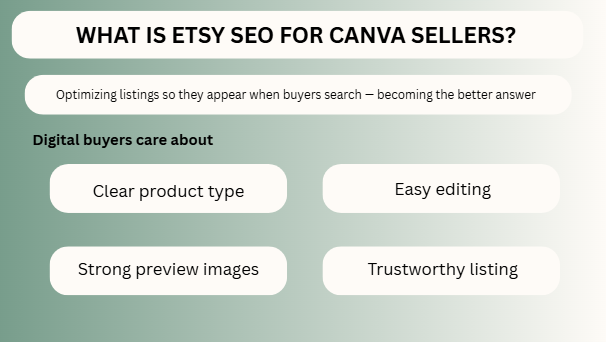
Etsy SEO means optimizing your listings so they appear when buyers search for products.
For Canva sellers, this usually includes digital products like:
- Canva templates
- Editable planners
- Resume templates
- Wedding invitations
- Social media packs
- Business forms
- Printable trackers
- Media kits
- Mockup packs
When a buyer types a search phrase, Etsy tries to show the most relevant listings with the best chance of satisfying that buyer.
Your job is to become the better answer.
Why Canva Sellers Need a Different SEO Strategy
Digital products behave differently from physical products.
You are often selling speed, convenience, customization, and instant download value.
That means buyers care about:
- Clear product type
- Easy editing
- Strong preview images
- What is included
- Fast understanding
- Trustworthy listing
A mug seller and a template seller may both use Etsy SEO, but the buyer psychology is different.
Master SEO Table
| SEO Area | What to Focus On | Why It Matters | Pro Tip |
| Niche Selection | Choose real demand products | Demand creates traffic | Solve specific problems |
| Keywords | Use buyer phrases | Helps visibility | Think like shopper |
| Title | Clear searchable wording | Ranking + clicks | Put main keyword early |
| Tags | Relevant search terms | Extra discovery paths | Use variations |
| Images | Strong thumbnails | Increases clicks | Design for mobile |
| Conversion | Better sales rate | Helps listing strength | Clear value fast |
| Reviews | Build trust | Improves buyer confidence | Easy products win reviews |
| Product Quality | Useful templates | Better retention | Simplicity sells |
| Shop Consistency | Strong brand feel | Trust signal | Unified style matters |
| Expansion | More related listings | Bigger traffic footprint | Turn winners into bundles |
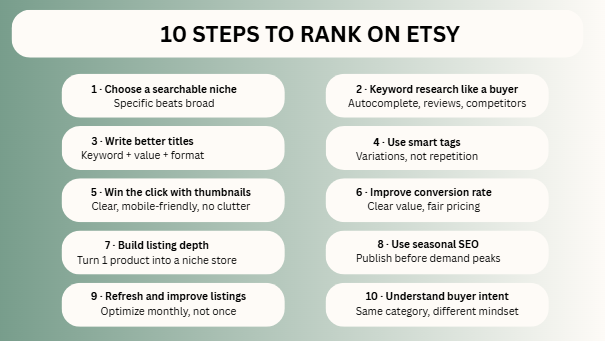
Step 1: Choose a Searchable Niche
Many beginners create what they like.
Smart sellers create what buyers search for.
Weak Idea:
Cute planner
Strong Idea:
ADHD student planner Canva template
Better Niche Examples:
- Wedding budget planner
- Realtor Instagram templates
- Teacher worksheet bundle
- Salon price list template
- Resume template for nurses
- Fitness coach social media kit
Specific products usually rank and convert better than broad products.
Step 2: Do Keyword Research Like a Buyer
Do not guess keywords.
Use phrases buyers actually type.
Where to Find Ideas:
- Etsy search autocomplete
- Competitor titles
- Reviews language
- Seasonal searches
- Related suggestions
Example Buyer Keywords:
- editable wedding invitation
- canva resume template
- instagram template canva
- printable budget planner
- business flyer canva template
The closer your words match buyer intent, the stronger your chances.
Step 3: Write Better Etsy Titles
Your title should be clear, searchable, and human-friendly.
Weak Title:
Cute Planner
Better Title:
Minimal Budget Planner Canva Template Editable PDF Instant Download
Why it works:
- Product type clear
- Buyer keywords included
- Value explained
- Format mentioned
Avoid titles that sound clever but hide the product.
Step 4: Use Smart Tags
Tags help Etsy understand extra search relevance.
Use keyword variations, not random repetition.
Example for Resume Listing:
- resume template
- canva resume
- cv template
- modern resume
- editable resume
- job application template
Use tags that reflect real searches and related intent.
Step 5: Win the Click with Better Thumbnails
A ranking without clicks is weak.
Your thumbnail is often the first selling moment.
Strong Thumbnail Rules:
- Clear product preview
- Easy to read text
- Clean layout
- Good contrast
- Mobile-friendly
- No clutter
Many Canva sellers lose traffic because their image looks confusing in small size.
Step 6: Improve Conversion Rate
Etsy wants listings buyers like.
If people click and buy, your listing becomes stronger.
Improve Conversion By:
- Showing what is included
- Clear description
- Strong mockups
- Easy editing instructions
- Fast delivery clarity
- Fair pricing
- Useful product quality
SEO does not stop at ranking. Sales behavior matters too.
Step 7: Build Listing Depth
One product rarely builds a store.
A niche collection does.
Example:
Winning product = Wedding invitation
Then expand into:
- Save the date template
- RSVP card
- Wedding planner
- Seating chart
- Bridal shower invite
- Full wedding bundle
Now you are not one listing. You are a niche store.
Step 8: Use Seasonal SEO
Some demand spikes every year.
Great examples:
- Christmas templates
- Graduation invitations
- Teacher planners
- New year goal planners
- Valentine cards
- Summer business promos
Publish early before demand peaks.
Waiting too late means competitors already own traffic.
Step 9: Refresh and Improve Listings
Many sellers upload once and disappear.
Winning sellers optimize monthly.
Check:
- Better thumbnail?
- Better title?
- Stronger tags?
- More pages added?
- Bundle opportunity?
- Better niche angle?
Small improvements can compound over time.
Step 10: Understand Buyer Intent
A person searching “resume template” may want speed.
A person searching “executive resume template” may want professionalism.
A person searching “wedding invitation template boho” wants style.
Same category. Different intent.
Your listing should match the exact mindset.
Common Canva Seller SEO Mistakes
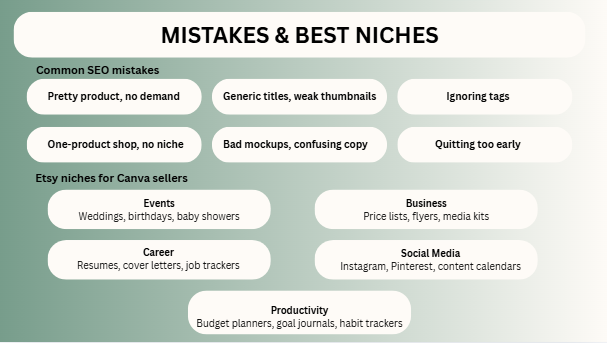
- Pretty product with no demand
- Generic titles
- Weak thumbnails
- Ignoring tags
- One-product shop
- No niche focus
- Bad mockups
- Confusing descriptions
- Quitting too early
- Copying trends blindly
Best Etsy Niches for Canva Sellers
Events
- Weddings
- Birthdays
- Baby showers
Business
- Price lists
- Flyers
- Media kits
Career
- Resumes
- Cover letters
- Job trackers
Social Media
- Instagram packs
- Pinterest templates
- Content calendars
Productivity
- Budget planners
- Goal journals
- Habit trackers
FAQs
Some listings move quickly, others need testing and time.
No. Clicks, conversions, and relevance matter too.
Usually yes, if quality stays strong.
Indirectly yes, because better clicks can help performance.
Yes, especially with smart niche targeting.
Expert Final Verdict
When you look at the final facts, Etsy SEO for Canva sellers is not about trying to trick a computer algorithm. It is simply about becoming the absolute best answer for a real buyer’s search. When you combine a smart niche, the right keywords, better thumbnail pictures, a truly useful product, and clever shop bundles, real growth finally becomes possible. The store owners who win are usually not the absolute best artists—they are just the best market listeners. On Etsy, your design gets people’s attention, but SEO is what gets you traffic.
If I were in your place, here are the steps I would take:
- Pick just one specific niche to focus on.
- Research the exact keywords buyers are typing.
- Launch 10 highly focused product listings.
- Improve your thumbnail images every single week.
- Expand your winning items into bigger packages and bundles.
- Use seasonal holidays and special events to get more sales.
- Stay completely consistent for several months.
When you treat your shop like a smart, repeatable system, that is how you turn small digital files into a real business!

I’m Faraz, the founder and lead content strategist at The Vistly. With a background in digital marketing, I lead content and design strategy for the site, working alongside a small team of designers to create practical Canva tutorials, font pairings, and design resources for creators, small businesses, and marketers around the world. My goal with The Vistly is to make professional-quality design accessible to anyone, no design degree required.