How to Create Mockups for Etsy (2026): Beginner Guide to More Clicks and Sales
Many Etsy sellers spend hours making great products, but then they lose sales for one simple reason: Their images do not show how valuable the item is.
A buyer cannot touch your product online. They cannot hold it, test it, or ask a shopkeeper to explain how it works. Your product photos and mockups have to do that entire job for you. That is exactly why learning how to create mockups for Etsy matters so much. A strong mockup image can increase your clicks, build customer trust, and help shoppers imagine owning your product. On the other hand, a weak image can hide a truly amazing item.This guide explains how to design professional pictures that get you more sales .
If you’re creating Etsy products in Canva, these related resources can also help you improve your designs, choose the right tools, and build better digital products:
- How to Sell Canva Templates on Etsy (2026): Beginner Guide to Real Income
- Can I Use Canva Pro Elements to Sell on Etsy? (2026 Honest Guide)
- Digital Product Ideas (2026): Best Things to Sell Online for Beginners and Creators
- Canva Free vs Pro (Honest Comparison for 2026)
- Canva Pinterest Post (2026): How to Create Pins That Get Clicks, Saves, and Traffic
What Is an Etsy Mockup?
A mockup is a preview image that shows your design on a realistic product or in a lifestyle scene.
Examples:
- T-shirt design shown on a model
- Wall art shown inside a room frame
- Planner pages shown on a desk
- Resume template shown on a laptop screen
- Mug design shown in a kitchen scene
- Invitation shown with flowers and decor
Master Mockup Table
| Mockup Type | Best For | Why It Works | Pro Tip |
| Lifestyle Mockup | Home decor, fashion | Feels real and emotional | Use natural scenes |
| Flat Lay Mockup | Printables, stationery | Clean and simple | Keep background neat |
| Device Mockup | Templates, resumes, ebooks | Shows digital use clearly | Use laptop + phone combo |
| Apparel Mockup | Shirts, hoodies, POD | Buyers imagine wearing it | Choose realistic models |
| Frame Mockup | Wall art | Shows scale and style | Match target room decor |
| Bundle Mockup | Packs and collections | Increases perceived value | Show multiple pages/items |
| Before/After Mockup | Editable templates | Demonstrates transformation | Great for templates |
| Branded Store Style | Full shop | Builds trust and identity | Keep colors consistent |
Why Mockups Matter on Etsy
Buyers make fast decisions.
Before they read your title or description, they usually notice the image first.
Good mockups help with:
- Better first impression
- Higher click-through rate
- More trust
- Clear product understanding
- Stronger emotional connection
- Better conversions
Many stores do not fail because of bad products. They fail because buyers never click.
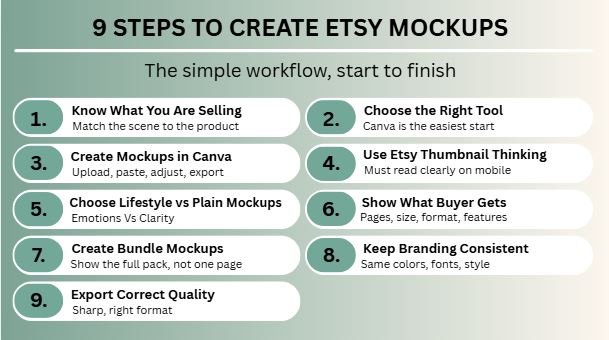
Step 1: Know What You Are Selling
Your mockup should match the product type.
If You Sell Printables:
Use desk scenes, notebooks, clipboards, planners.
If You Sell POD Products:
Use shirts, mugs, tote bags, posters.
If You Sell Digital Templates:
Use screens like laptops, tablets, phones.
If You Sell Wall Art:
Use modern room frames and styled interiors.
Wrong scene = confused buyer.
Step 2: Choose the Right Tool
You do not need expensive software to start.
Easy Options
- Canva
- Adobe Photoshop
- Placeit
- Smartmockups
For beginners, Canva is often the easiest starting point.
Step 3: Create Mockups in Canva
This is one of the fastest methods.
Basic Process:
- Open Canva
- Choose Etsy listing image size
- Upload your design
- Add mockup frame or scene
- Place design correctly
- Adjust shadows and spacing
- Add text only if needed
- Export high quality image
Simple workflow. Fast results.
Step 4: Use Etsy Thumbnail Thinking
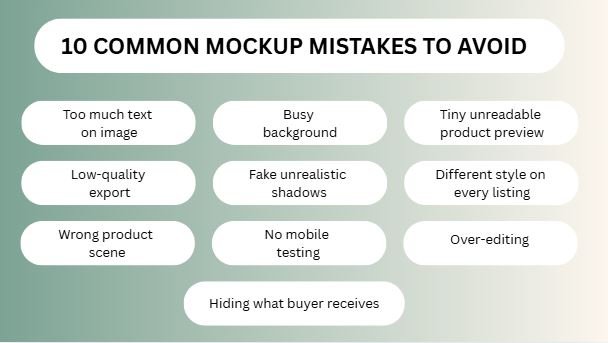
Your first image must work on mobile screens.
That means:
- Clear product focus
- Large readable design
- No clutter
- Good contrast
- Easy to understand in one second
A detailed image that looks beautiful on desktop can fail badly on mobile.
Step 5: Choose Lifestyle vs Plain Mockups
Lifestyle Mockups
Show product in real use.
Best for:
- Fashion
- Wall art
- Invitations
- Gifts
These create emotion.
Plain Mockups
Simple clean product on neutral background.
Best for:
- Professional templates
- Minimal brands
- Technical products
These create clarity.
Best stores often use both across images.
Step 6: Show What Buyer Gets
Many buyers hesitate because they are unsure what is included.
Use extra listing images to show:
- Number of pages
- Sizes included
- Editable features
- Formats
- How to download
- How to use
Clarity reduces hesitation.
Step 7: Create Bundle Mockups
If you sell packs, do not show one page only.
Show the full value.
Example:
Instead of one Instagram post preview, show:
- 12 post templates
- 6 story templates
- Bonus covers
- Color variations
Bundles look more valuable when visualized properly.
Step 8: Keep Branding Consistent
Your Etsy shop should feel like one brand.
Use consistent:
- Colors
- Fonts
- Image style
- Background tones
- Layout style
When listings look connected, trust increases.
A random-looking shop feels weaker.
Step 9: Export Correct Quality
Blurry images can kill conversions.
Use:
- High resolution
- Clean crop
- Sharp text
- Balanced file size
- Correct format (usually JPG or PNG)
Always test how it looks after upload.
Best Mockups by Product Type
Resume Templates
Use laptop screen + printed page.
Wedding Invitations
Use flowers, envelopes, table decor.
Wall Art
Use living room or bedroom scene.
T-Shirts
Use realistic model photos.
Planners
Use desk flat lay with pen and coffee.
Social Media Packs
Use phone screen carousel previews.
Free vs Paid Mockups
Free Mockups
Good for starting. Lower cost. Great for testing.
Paid Mockups
Often better quality, more unique, less overused.
If you start earning, upgrading visuals can be smart.
How to Improve Clicks Over Time
Do not upload once and forget.
Test:
- New first image
- Cleaner background
- Bigger product preview
- Better room scene
- Stronger bundle image
- Better mobile readability
Sometimes image change alone can improve performance.
FAQs
No, but Canva is one of the easiest tools for beginners.
The one that clearly shows value to the target buyer.
Often yes, especially for emotional or decor products.
Use multiple listing images to explain product value.
They can improve clicks, trust, and conversion potential.
Final Thoughts
When you look at the final facts, learning how to create mockups for Etsy is not just a design task. It is a powerful sales skill! Your mockup image should answer three buyer questions instantly:
What is this?
Is it good?
Can I imagine using it in my daily life? If your picture answers those questions quickly, your clicks will rise. The best preview image is never the fanciest one on the internet—it is simply the one that makes buying easier. On Etsy, good products definitely matter, but great presentation is what gets you noticed first!
If I were in your place, here are the steps I would take:
- Fix your very first thumbnail image before changing anything else.
- Use a clean, mobile-friendly design that looks good on phones.
- Show the value of your item clearly at a single glance.
- Match your mockup style directly to the product type you are selling.
- Test out new images monthly to see what your customers like.
- Build one consistent brand style across your entire store.

I’m Faraz, the founder and lead content strategist at The Vistly. With a background in digital marketing, I lead content and design strategy for the site, working alongside a small team of designers to create practical Canva tutorials, font pairings, and design resources for creators, small businesses, and marketers around the world. My goal with The Vistly is to make professional-quality design accessible to anyone, no design degree required.