
How to Sell Canva Templates on Etsy (2026): Beginner Guide to Real Income
Almost everyone is looking for a smart way to make money online without risking a lot of cash upfront. If you don’t want to deal with physical stock, delivery hassles, or customer shipping complaints, digital items are the perfect answer. Specifically, selling Canva templates on Etsy has become one of the most practical business setups for beginners today. You don’t need to be a professional designer to do this, because Canva gives you all the basic tools to drag and drop elements easily.
The beauty of this model is that you design the product once, and it can sell a thousand times automatically. But remember, the store owners who actually succeed are the ones who know how to do proper research and use smart SEO tricks. We will show you the exact blueprint for finding hungry audiences, designing beautiful templates, and setting up your store for long-term success. If you’re planning to sell Canva templates, these related guides can help you create better products, choose the right tools, and improve your Etsy listings:
- Canva Free vs Pro (Honest Comparison for 2026)
- Can I Use Canva Pro Elements to Sell on Etsy? (2026 Honest Guide)
- How to Create Mockups for Etsy (2026): Beginner Guide to More Clicks and Sales
- Best Canva Font Pairings (Free Combinations That Actually Work)
- Canva Pinterest Post (2026): How to Create Pins That Get Clicks, Saves, and Traffic
What Are Canva Templates?
Canva templates are pre-designed editable files that buyers can customize inside Canva.
Instead of designing from zero, customers open your template, edit text, colors, photos, and download their finished version.
Popular examples:
- Resume templates
- Wedding invitations
- Social media post packs
- Business flyers
- Media kits
- Planners
- Budget trackers
- Real estate templates
- Ebook templates
- Price lists
- Thank you cards
- Business forms
“Think of it this way: You make furniture and put it in a shop. Each piece of furniture is colored to match its own house.”
Master Success Table
| Category | What to Do | Why It Matters | Pro Tip |
| Product Type | Sell useful templates | Demand creates sales | Solve a real problem |
| Niche Research | Find specific buyers | Less competition | Go niche, not broad |
| Canva Setup | Build editable designs | Better customer experience | Keep layout clean |
| Etsy Listing | Strong title + images | Helps ranking and clicks | Thumbnail matters a lot |
| SEO | Use search keywords | Organic traffic growth | Add buyer intent terms |
| Pricing | Smart starting price | Helps conversions | Raise later with reviews |
| Delivery | PDF with Canva link | Instant access for buyers | Add clear instructions |
| Branding | Professional store look | Builds trust | Use consistent style |
| Reviews | Great experience | Social proof boosts sales | Make use easy |
| Scaling | More listings + bundles | Bigger income potential | Turn winners into packs |
Can You Legally Sell Canva Templates?
Yes, but you must follow Canva’s content and licensing rules.
General rule:
- You can create original templates and sell access to your designs.
- You should avoid copying other sellers.
- Do not sell copyrighted logos, trademarks, or stolen content.
- Be careful with premium elements, fonts, and third-party assets.
- Always review Canva’s latest terms directly before scaling.
The safest route is simple: create original products that solve buyer problems.
Why Selling Canva Templates Works
This model works because buyers want speed.
A bride planning a wedding does not want to design an invitation from scratch.
A job seeker wants a clean resume today.
A small business owner needs an Instagram promo quickly.
You are not just selling design. You are selling saved time.
And saved time sells.
Best Canva Templates to Sell on Etsy
Instead of random products, focus on proven buyer intent categories.
Personal Events
- Wedding invites
- Baby shower templates
- Birthday invitations
- Thank you cards
Career & Business
- Resume templates
- Invoice templates
- Price lists
- Service guides
- Media kits
Social Media
- Instagram post packs
- Pinterest templates
- Story templates
- YouTube thumbnails
Productivity
- Digital planners
- Habit trackers
- Budget planners
- Goal journals
Real Estate & Local Services
- Property flyers
- Open house templates
- Menu designs
- Salon promos
If I were in your place, I wouldn’t just in to broad market, I would choose a key niche
Example: not “planner”
Better: “ADHD student planner” or “wedding budget planner”
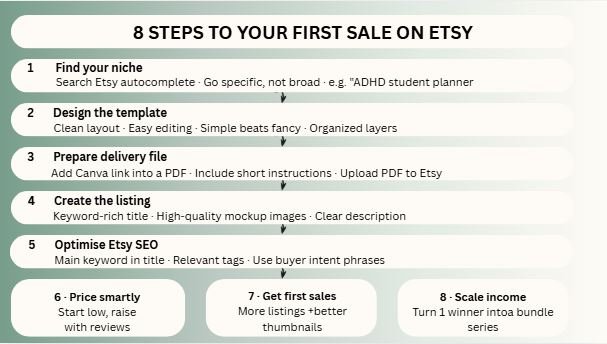
Step 1: Find a Profitable Niche
This is where many beginners fail.
They make what they like. Smart sellers make what buyers search.
How to Research:
- Search Etsy autocomplete suggestions
- Check top-selling stores
- Read customer reviews
- Look for poor-quality competitors
- Find repetitive buyer needs
- Choose evergreen problems
Good Signs:
- Many searches
- Weak competitors
- Clear buyer need
- Easy to improve design
Step 2: Create a High-Quality Canva Template
Open Canva and build a product that feels easy to use.
Important Rules:
- Keep fonts readable
- Use clean spacing
- Make editing simple
- Use organized layers
- Add duplicate pages if needed
- Avoid clutter
- Design for the target buyer
If the buyer feels confused, refund risk increases.
Simple usually sells better than fancy.
Step 3: Prepare Delivery File
You usually do not upload the Canva template itself directly as the final product.
Common method:
- Create template link in Canva
- Add that link into a PDF
- Include short instructions
- Upload PDF to Etsy
Buyer downloads PDF → clicks link → opens editable template.
This feels more professional and reduces confusion.
Step 4: Create an Etsy Listing That Gets Clicks
Many good products fail because the listing is weak.
Your listing needs:
Strong Title
Use keywords buyers search.
Example:
Editable Wedding Invitation Template Canva | Minimal Invite | Instant Download
High-Quality Images
Show:
- Final design preview
- Editable pages
- What buyer receives
- Mobile/Desktop use
- Feature highlights
Clear Description
Explain:
- What is included
- How to edit
- Instant download process
- File size/pages
- Refund policy basics
Step 5: Use Etsy SEO Properly
Etsy is a search engine inside a marketplace.
If no one finds your listing, no one buys it.
Focus On:
- Main keyword in title
- Relevant tags
- Clear category
- Good thumbnails
- Strong conversion rate
- Positive reviews
Example Keywords:
- canva wedding template
- editable resume template
- instagram canva templates
- business planner printable
Use real phrases buyers type.
Step 6: Price Your Templates Smartly
New sellers often price too high or too low.
Better Strategy:
New Shop
Use competitive pricing to get first sales.
Growing Shop
Increase prices after reviews and proof.
Premium Option
Sell bundles with more value.
Example:
- Single template = lower price
- 25 social media pack = higher price
- Wedding suite bundle = premium price
Step 7: Get Your First Sales
Your first sales usually come from momentum, not luck.
Action Plan:
- Publish multiple listings
- Improve thumbnails
- Target low-competition niches
- Use better keywords
- Add clear mockups
- Keep store branding clean
- Update weak listings weekly
One listing may fail. The tenth may win.
Step 8: Scale Into Real Income
Once one product sells, do not start from zero again.
Turn winners into systems.
Example:
Winning product: Resume template
Then create:
- Teacher resume
- Executive resume
- Creative resume
- Student resume
- Resume bundle
- Cover letter add-on
This is how small stores grow.
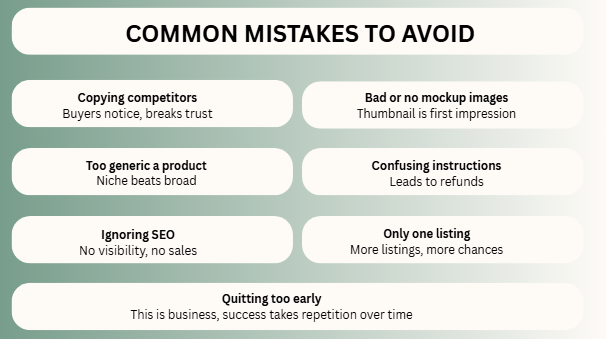
Common Mistakes to Avoid
- Copying competitors
- Bad thumbnails
- Too generic products
- Confusing instructions
- Ignoring SEO
- Uploading one product only
- Ugly fonts
- Overcrowded layouts
- Wrong niche selection
- Quitting too early
Can Beginners Really Make Money?
Yes, but not by uploading random designs.
Success usually comes from:
- Smart niche choice
- Useful templates
- Better visuals
- Search optimization
- Patience
- Repetition
This is business, not magic.
Is This Good for Pakistani Sellers?
Yes, many people from Pakistan explore digital product models.
But treat it seriously:
- Understand platform policies
- Handle payment setup correctly
- Keep professional communication
- Deliver quality products
- Build long-term trust
Global buyers care more about value than location.
FAQs
Not always, but Pro can improve workflow and design options.
More quality listings usually increase chances of sales.
Yes, but only if buyers can find it and it solves a need.
Very. Search visibility drives many sales.
Final thought
When you look at the final facts, selling Canva templates on Etsy is one of the most beginner-friendly business setups you can start. It combines super low startup costs, zero physical inventory, and digital products you can sell over and over again. But because it is so easy to start, it also means a lot of other people are doing it too. The store owners who win are usually not the absolute best artists—they are just the best problem-solvers. If your design saves people time and looks clean, buyers will notice your shop.
If I were in your place, here are the steps I would take:
- Pick just one specific niche to focus on.
- Create 10 high-quality, focused templates.
- Optimize every single listing so people can find them.
- Make your thumbnail pictures look beautiful and clear.
- Watch which products are winning in the market.
- Turn your winning items into bigger packages and bundles.
- Repeat this exact same process every single month.
Small digital files can turn into a real, money-making business when you treat them like a smart system!

I’m Faraz, the founder and lead content strategist at The Vistly. With a background in digital marketing, I lead content and design strategy for the site, working alongside a small team of designers to create practical Canva tutorials, font pairings, and design resources for creators, small businesses, and marketers around the world. My goal with The Vistly is to make professional-quality design accessible to anyone, no design degree required.