Can I Use Canva Pro Elements to Sell on Etsy? (2026 Honest Guide)
Many new sellers buy a premium account and think one simple thing: “Now I can just use anything inside the app and sell it anywhere I want.”
But that is exactly where the big confusion starts! Having access to Canva Pro elements does not automatically mean you have unlimited rights to resell them for every single project. There is a massive difference between using a cute graphic inside your own finished design and trying to resell the graphic itself. If you want to sell templates safely on Etsy, this guide will give you the real-world answer.
If you’re planning to sell Canva-based products on Etsy, these guides can help you create better products, understand Canva plans, and improve your store:
- How to Create Mockups for Etsy (2026): Beginner Guide to More Clicks and Sales
- How to Sell Canva Templates on Etsy (2026): Beginner Guide to Real Income
- Digital Product Ideas (2026): Best Things to Sell Online for Beginners and Creators
- Canva Free vs Pro (Honest Comparison for 2026)
- How Much Is Canva Pro? (Honest Pricing Guide for 2026)
Quick Answer
Yes, in many cases you can use Canva Pro elements inside original products you create for sale.
But no, you generally should not treat Canva Pro elements as standalone items to resell, redistribute, or claim as your own raw assets.
Simple rule:
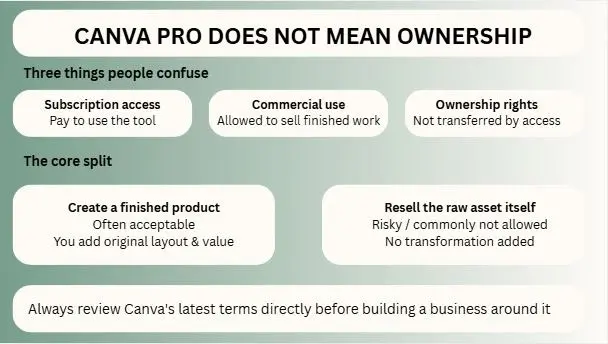
- Create a new finished product = Often acceptable
- Resell the asset itself = Risky / commonly not allowed
Always review Canva’s latest terms directly before building a business around it.
Why So Many Sellers Get Confused
The confusion happens because people mix three different things:
- Subscription access
- Commercial use
- Ownership rights
These are not the same.
Paying for a tool gives access to features.
It does not always transfer ownership of every asset inside that tool.
Think of it this way: By getting a Netflix subscription, you can watch movies. Doesn’t that mean you can make your own DVD of the movie and sell it?
Master Clarity Table
| Scenario | Usually Safer or Riskier | Why It Matters | Smart Advice |
| Planner designed by you using some Pro elements | Safer | New finished product created | Add your own structure |
| Wedding invite with custom text/layout | Safer | Transformative design use | Make it original |
| Social media templates you designed | Safer | Buyer purchases your design system | Use unique branding |
| Printable checklist with icons | Safer | Elements support the product | Focus on utility |
| Selling one Canva icon pack alone | Riskier | Standalone asset resale issue | Avoid |
| Downloaded Pro image sold as your file | Riskier | Redistribution concern | Avoid |
| Minimal edit of Canva template resold | Riskier | Low originality risk | Improve heavily |
| Claiming Canva art as your artwork | Riskier | Misrepresentation problem | Be honest |
| POD item with thoughtful custom design | Depends | Check specific use + terms | Verify policy |
| Entire shop built on copied assets | High Risk | Takedown / trust issues | Build original products |
What “Original Product” Really Means
Many sellers hear “make it original” but do not know what that means.
An original product usually includes your own creative input such as:
- New layout
- Unique text
- Different structure
- Custom branding
- Combined elements in a fresh way
- Buyer-focused functionality
- Improved usability
You are adding value, not flipping assets.
That difference matters.
Can You Sell Canva Templates on Etsy Using Pro Elements?
Often yes, if the template is something you designed.
Examples:
- Resume template
- Wedding invitation
- Instagram post pack
- Price list template
- Media kit
- Planner pages
The customer is buying your editable template system, not just one raw icon.
Still, avoid lazy copies or near-identical remixes of stock designs.
Can You Sell Printables Made in Canva?
Usually this is one of the most common seller models.
Examples:
- Checklists
- Wall planners
- Habit trackers
- Budget sheets
- Meal planners
- Kids worksheets
If the printable solves a need and includes your own design work, it is stronger than simply exporting random graphics.
Can You Sell POD Products Using Canva Pro Elements?
This can depend on the specific asset and platform rules.
Examples:
- Mug designs
- T-shirts
- Tote bags
- Posters
- Stickers
Safer path:
- Add your own slogan
- Build custom composition
- Mix your own branding
- Create a unique design concept
Riskier path:
- Taking one stock element and placing it on a shirt with no real transformation
When print-on-demand is involved, double-check both Canva and marketplace rules.
What You Should Avoid Selling
To reduce risk, avoid these habits:
- Raw downloaded Canva graphics
- Single icons sold in bundles
- Stock photos sold as your own pack
- Tiny edits of pre-made templates
- Trademarked names or logos
- Copyrighted characters
- “I made this from zero” when you did not
Short-term shortcuts can damage long-term business trust.
Canva Pro Does Not Mean Ownership
This is one of the biggest misunderstandings online.
Canva Pro gives broader access and workflow advantages, such as premium assets and tools. It does not mean every included asset becomes fully yours in every resale scenario.
Access and ownership are different legal ideas.
Smart sellers respect that difference.
Best Safe Strategy for Etsy Sellers
If I were building a long-term Etsy store, I would use this model:
1. Solve Real Problems
Create products buyers need.
Examples:
- Teacher planner
- Wedding invite set
- Realtor flyer pack
- Salon Instagram bundle
2. Add Strong Original Input
Use your own layout, copy, style, structure.
3. Improve Utility
Make files easy to edit and understand.
4. Build a Brand
Use consistent colors, mockups, store identity.
5. Keep Checking Policies
Platforms update terms.
Real Beginner Mistakes
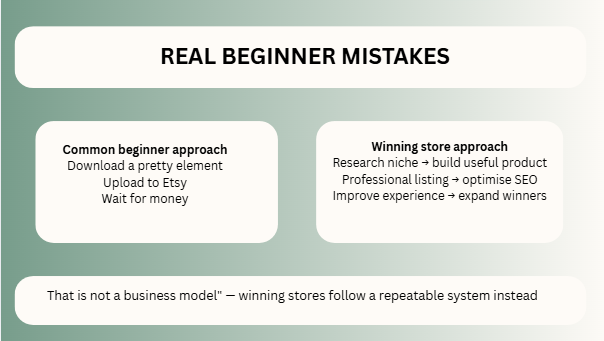
Many new sellers fail because they do one of these:
- Download pretty element
- Upload to Etsy
- Wait for money
That is not a business model.
Winning stores usually do this:
- Research niche
- Build useful product
- Make professional listing
- Optimize SEO
- Improve customer experience
- Expand winning products
Better Long-Term Alternatives
If you want maximum control, mix Canva with assets you properly source or create yourself.
Examples:
- Your own illustrations
- Licensed fonts
- Original icons
- Custom brand systems
- Unique photography
The more original your store becomes, the safer and stronger it gets.
Is It Worth Using Canva for Etsy?
Yes, Canva can still be a powerful tool for Etsy sellers because it helps with:
- Faster creation
- Better mockups
- Easier editing
- Quick product development
- Beginner-friendly workflow
Just do not confuse “easy tool” with “no rules.”
FAQs
Often yes, if they are your own original template products.
That is commonly the type of use sellers should avoid.
Yes, many sellers do, especially when the design adds value.
It can be a useful tool, but success still depends on niche, SEO, and quality.
Yes. Always review current platform policies.
Expert Final Verdict
Yes, you can often use Canva Pro elements inside original Etsy products. But no, you should never rely on reselling those items as standalone products. The safest path to take is super simple: use Canva as a helpful tool to build real value, not as a lazy shortcut to flip other people’s assets. Sellers who create actual solutions for their customers usually last much longer than sellers who are just looking for sneaky loopholes.
If I were in your place, here are the steps I would take:
- Use Canva to make your designing process faster.
- Focus on creating original products that look unique.
- Avoid asset flipping or copying basic stickers.
- Focus heavily on solving your buyer’s actual problems.
- Build a real, trustworthy brand over time.
- Recheck the app’s rules and terms regularly to stay safe.
Easy tools definitely help you get started, but a smart strategy is what actually wins!

I’m Faraz, the founder and lead content strategist at The Vistly. With a background in digital marketing, I lead content and design strategy for the site, working alongside a small team of designers to create practical Canva tutorials, font pairings, and design resources for creators, small businesses, and marketers around the world. My goal with The Vistly is to make professional-quality design accessible to anyone, no design degree required.