Canva Fonts for Kids (Best Free & Paid Picks for Fun Designs)
As someone who makes printables and learning games, I know a secret: kids look at fonts before they read the words! But finding the right font in Canva can be tricky. We often spend hours trying different styles. If a font is too clean, it has no energy. If it is too playful, kids cannot read it properly. We want our designs to look exciting and professional. The right font can make a simple worksheet look like a fun game. That is why I made this list. These are my favorite Canva fonts for kids’ projects. They are clear, high-energy, and perfect for parents, teachers, and digital creators.
Quick Answer
The best Canva fonts for kids are Lilita One, Poppins, Nunito, Jua, More Sugar, Schoolbell, Balabeloo, and Open Sans. These fonts work well for worksheets, birthday invitations, classroom posters, activity sheets, thumbnails, and playful designs.
If you’re creating Canva designs for children, these related guides can help you choose better fonts, create classroom materials, and improve your overall designs:
- Best Canva Fonts for Teachers (Free & Paid Picks That Actually Work)
- Best Handwriting Fonts in Canva
- Best Canva Font Pairings (Free Combinations That Actually Work)
- Best Aesthetic Canva Fonts (2026): Stylish Fonts for Beautiful Designs, Branding, and Social Media
- Best Cute Canva Fonts (2026): Playful, Pretty, and Stylish Fonts for Better Designs
What Makes a Good Kids Font?
A strong kids font should do these things:
- Look fun and friendly
- Stay easy to read
- Work well in print
- Catch attention fast
- Match the child age group
If a font looks cute but is hard to read, it is not the best choice.
Best Canva Fonts for Kids
| Font Name | Best For | Style | Availability |
| Lilita One | Posters, Titles | Bold Fun | Free |
| Poppins | Worksheets | Clean Modern | Free |
| Nunito | Body Text | Friendly Rounded | Free |
| Jua | Bold Headings | Playful Bold | Free |
| Open Sans | Reading Text | Clear Neutral | Free |
| More Sugar | Invites | Cute Playful | Free / Varies |
| Schoolbell | Preschool Sheets | Handwritten Friendly | Free / Varies |
| Balabeloo | Party Designs | Fun Decorative | Free / Varies |
| Premium Canva Fonts | Unique Styles | Varies | Canva Pro / Paid |
NOTE:Some font availability may depend on your Canva plan, region, account setup, or updates inside the Canva editor.
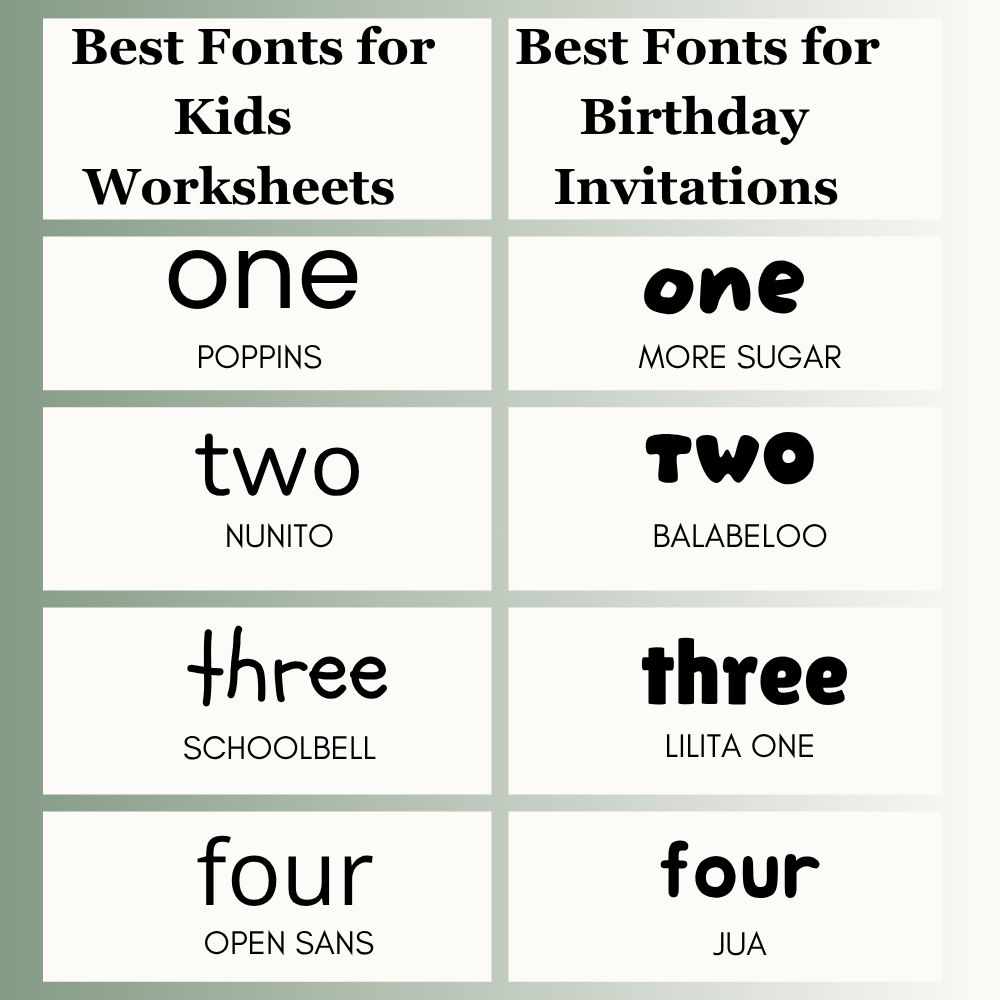
Best Fonts for Kids Worksheets
Worksheets should be clear and easy to read. Children should focus on learning, not struggle with letters.
Best picks:
- Poppins
- Nunito
- Schoolbell
- Open Sans
These fonts work well for homework sheets, tracing pages, and activity packs.
Best Fonts for Birthday Invitations
Party designs should feel fun and exciting.
Best picks:
- More Sugar
- Balabeloo
- Lilita One
- Jua
Use bright colors and short headings for stronger results.
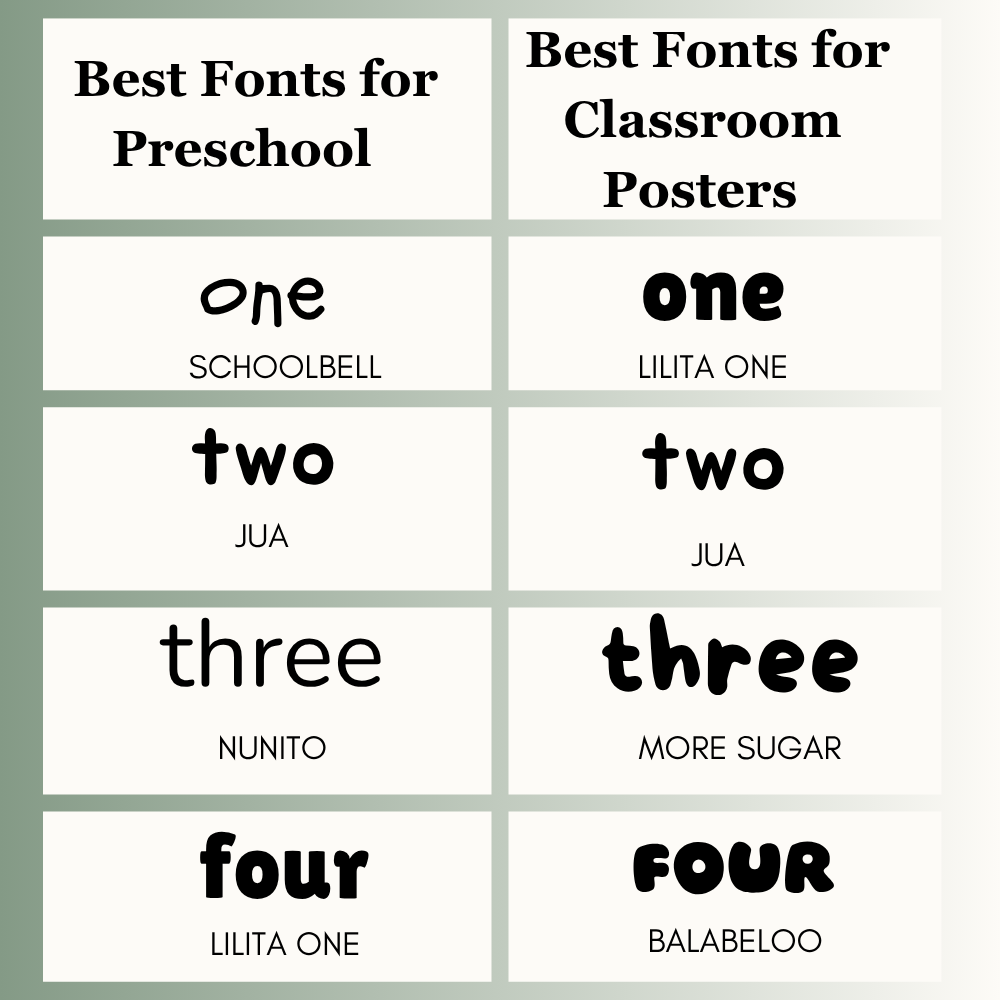
Best Fonts for Preschool
Young children respond well to simple and playful fonts.
Best picks:
- Schoolbell
- Jua
- Nunito
- Lilita One
These fonts are useful for labels, tracing sheets, and preschool activities.
Best Fonts for Classroom Posters
Posters should be easy to notice from a distance.
Best picks:
- Lilita One
- Jua
- More Sugar
- Balabeloo
Use bold headings and short text.
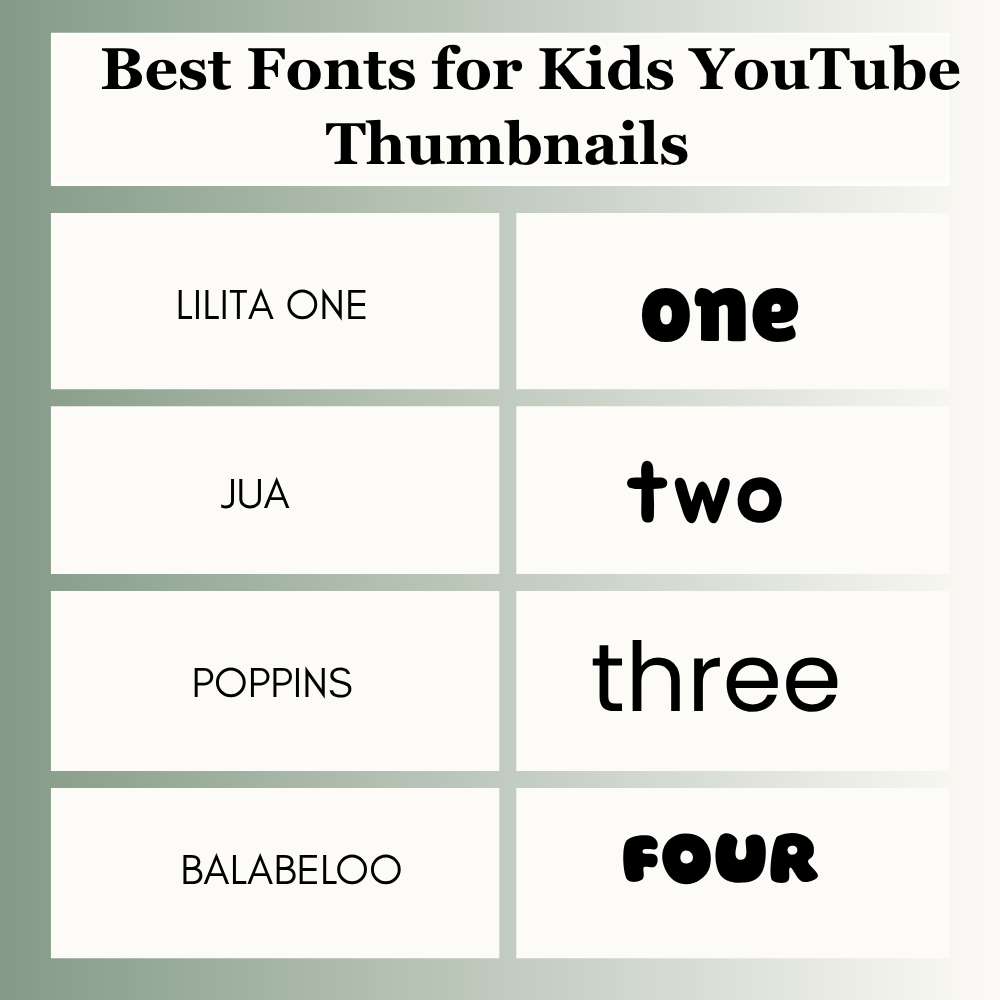
Best Fonts for Kids YouTube Thumbnails
Thumbnails need quick attention and strong visibility on mobile screens.
Best picks:
- Lilita One
- Jua
- Poppins
- Balabeloo
Bold fonts usually perform better.
Best Free Canva Fonts for Kids
If you use Canva Free, you still have many strong choices such as Lilita One, Poppins, Nunito, Jua, and Open Sans. These fonts are enough for most kids projects.
If you use Canva Pro, you may see extra font choices and more creative styles depending on your account.
Best Fonts by Age Group
Toddlers / Preschool
- Schoolbell
- Nunito
- Jua
Use simple and friendly letter shapes.
Primary Kids
- Lilita One
- Poppins
- More Sugar
These fonts feel fun while staying readable.
Older Kids
- Poppins
- Open Sans
- Jua
Older children often prefer cleaner and more modern styles.
Best Easy-to-Read Canva Fonts for Kids
Some children learn better with clean and simple text.
Best picks:
- Poppins
- Nunito
- Open Sans
- Schoolbell
Use clear spacing and avoid messy decorative styles.
Best Canva Font Pairings for Kids
Use one heading font and one body font.
- Lilita One + Poppins
- More Sugar + Nunito
- Jua + Open Sans
- Schoolbell + Poppins
This keeps the design fun and balanced.
Print vs Screen Font Tip
Some fonts look better on paper, while others perform better on screens.
Best for Print
- Poppins
- Nunito
- Open Sans
Best for Screen
- Lilita One
- Jua
- Balabeloo
Always test one sample before printing a full set.
Need a Fast Pick?
If you need a quick choice, start here:
- Worksheet → Poppins
- Invite → More Sugar
- Preschool → Schoolbell
- Poster → Lilita One
- Thumbnail → Jua
This saves time during busy projects.
How to Choose the Right Kids Font
1. Check the Purpose
Is it for a worksheet, invite, poster, or thumbnail?
2. Think About Age Group
Toddlers need different fonts than older kids.
3. Test Readability
Can a child read it quickly?
4. Check Print Quality
Some fonts look good on screen but weak on paper.
5. Keep It Simple
Use one heading font and one body font in most designs.
Common Mistakes to Avoid
Many users make these font mistakes:
- Using too many fonts
- Choosing messy styles
- Making text too small
- Using hard-to-read script fonts
- Ignoring print preview
- Picking style over clarity
Avoiding these mistakes improves results quickly.
Frequently Asked Questions
There is no single best font for every project. Popular choices include Lilita One, Poppins, Jua, Nunito, and More Sugar.
Poppins, Nunito, Schoolbell, and Open Sans are strong choices for worksheets.
More Sugar, Balabeloo, Lilita One, and Jua work well for party designs.
Yes. Many free fonts are excellent for worksheets, posters, and invitations.
Use two fonts in most cases. One for headings and one for body text.
Not always. Many free fonts work very well. Paid fonts may offer more unique styles.
Final Thoughts
Worksheets and birthday cards should look different. Learning pages need Poppins or Nunito. Their letters are clean, like school handwriting. Party invites or classroom decor need energy. Try Lilita One or More Sugar. Signs and covers need Jua. It is thick and stands out instantly.
Kids’ designs must be clear, fun, and easy to understand. Cute layouts fail if children struggle to read the text. Keep your design simple. Choose one playful heading font. Pair it with a plain body font. Leave empty space on the page. Print a test page before sharing.
Expert Tip
After testing kids worksheets, party invites, posters, and printable packs, clear playful fonts usually perform best. If you are unsure, start with Lilita One, Poppins, or Nunito.

I’m Faraz, the founder and lead content strategist at The Vistly. With a background in digital marketing, I lead content and design strategy for the site, working alongside a small team of designers to create practical Canva tutorials, font pairings, and design resources for creators, small businesses, and marketers around the world. My goal with The Vistly is to make professional-quality design accessible to anyone, no design degree required.