Best Handwriting Fonts in Canva
Honestly, you don’t need a fancy or complicated design to make your Canva projects look good. It really just depends on the font you use. But picking a handwriting font that looks cute also doesn’t hurt people’s eyes on a phone screen is so hard. If your text is hard to read on mobile, it just wastes all your effort. I’ve tested so many fonts for different client projects, flyers, and blogs, and I learned the hard way that a font has to be clean before it is pretty. That’s why I made this guide. I’m skipping the useless lists and showing you exactly what works for your specific goal so you can save time and stop guessing.
If you want to explore more font styles for your Canva designs, these related guides can help you find the right look for branding, social media, and other projects:
- Best Aesthetic Canva Fonts (2026): Stylish Fonts for Beautiful Designs, Branding, and Social Media
- Best Cursive Fonts on Canva (2026): Elegant Script Fonts for Logos, Weddings, and Social Media
- Best Canva Font Pairings (Free Combinations That Actually Work)
- Best Canva Fonts for Logos
- Canva Free vs Pro (Honest Comparison for 2026)
Quick Answer:
If you need a fast answer, start with these popular choices:
- Brittany – elegant and soft
- Halimum – signature style
- Homemade Apple – natural handwriting look
- Apricots – fun and bold
- Amsterdam Three – modern script
- Gloria Hallelujah – playful and friendly
- Gochi Hand – casual and clean
- Moontime – stylish and premium
These fonts work well for many design styles.
Quick Decision Table
| Need | Best Font |
| Elegant Branding | Brittany |
| Signature Style | Halimum |
| Casual Friendly Look | Homemade Apple |
| Social Media | Apricots |
| Invitation Design | Moontime |
| Kids Design | Gloria Hallelujah |
What Makes a Good Handwriting Font?
Not every script font is a smart choice. The best handwriting fonts in Canva usually have these features:
- Easy to read
- Natural handwritten feel
- Good spacing between letters
- Clear on mobile screens
- Matches your design mood
- Looks good with simple fonts
A beautiful font is useless if people cannot read it.
Best Handwriting Fonts in Canva by Use Case
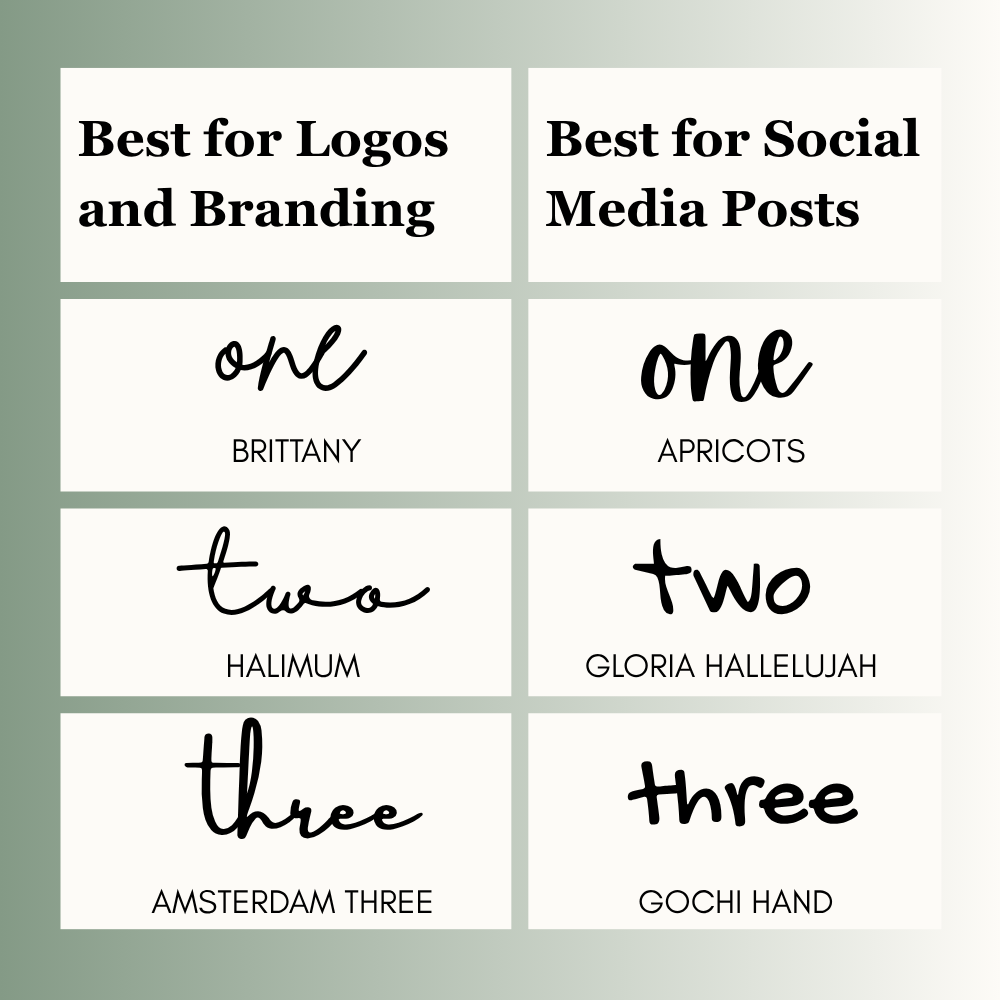
Best for Logos and Branding
These fonts help brands look personal and polished.
- Brittany – elegant and premium
- Halimum – stylish signature look
- Amsterdam Three – modern and clean
Best for coaches, boutiques, beauty brands, and freelancers.
Best for Social Media Posts
These fonts help posts feel warm and eye-catching.
- Apricots – bold and fun
- Gloria Hallelujah – playful tone
- Gochi Hand – clean and casual
Great for Instagram quotes, reels covers, and promo posts.
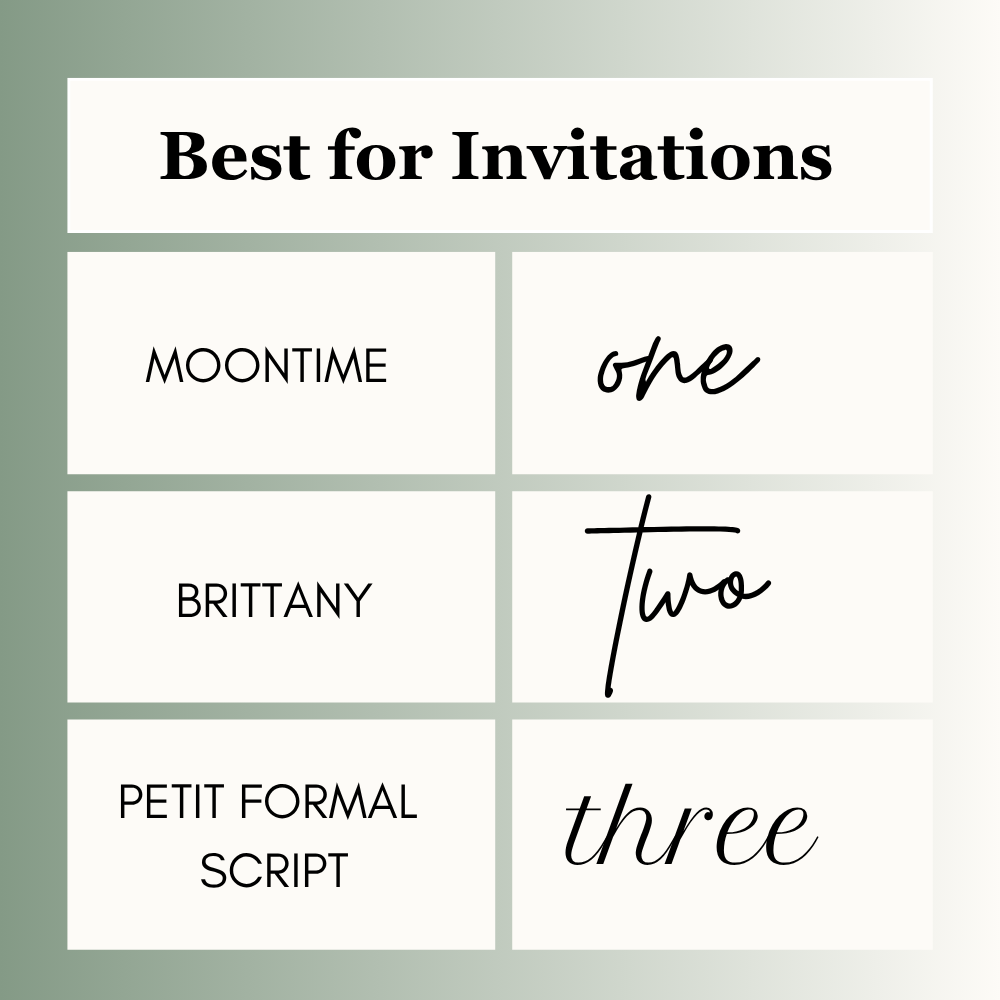
Best for Invitations
These fonts look soft and classy.
- Moontime – elegant style
- Brittany – wedding friendly
- Petit Formal Script – classic look
Best for weddings, birthdays, and events.
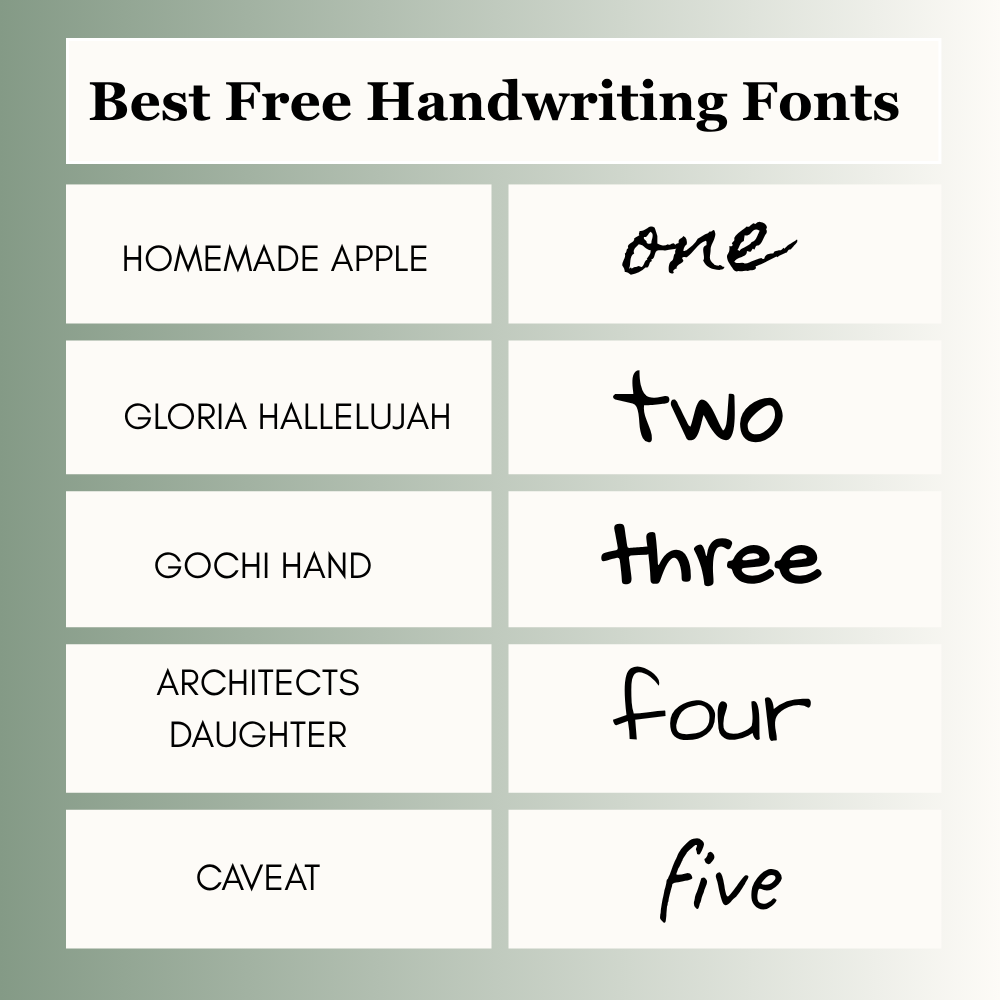
Best Free Handwriting Fonts in Canva
If you use the free plan, start here:
- Homemade Apple
- Gloria Hallelujah
- Gochi Hand
- Architects Daughter
- Caveat
Some fonts may depend on your plan, region, or account setup, so always check your Canva editor.
Free vs Pro Canva Handwriting Fonts
Some handwriting fonts are available on the free Canva plan, while others may require Canva Pro. The font library can change over time, so it is always smart to check inside your Canva editor before starting a design. If you design often for clients or business use, Canva Pro can save time.
Best Fonts by Business Type
Choosing a font based on your niche can make your design feel more professional and targeted.
| Business Type | Recommended Font |
| Bakery | Brittany |
| Coach | Halimum |
| Wedding Planner | Moontime |
| Teacher | Gloria Hallelujah |
| Etsy Shop | Apricots |
| Beauty Brand | Amsterdam Three |
| Blogger | Homemade Apple |
Match the font style with the feeling of your brand.
Readability Table
| Font | Best For | Readability |
| Brittany | Branding | High |
| Halimum | Signature | Medium |
| Homemade Apple | Casual Designs | High |
| Apricots | Social Media | High |
| Moontime | Invitations | Medium |
Best Font Pairings
A handwriting font looks better with a clean second font.
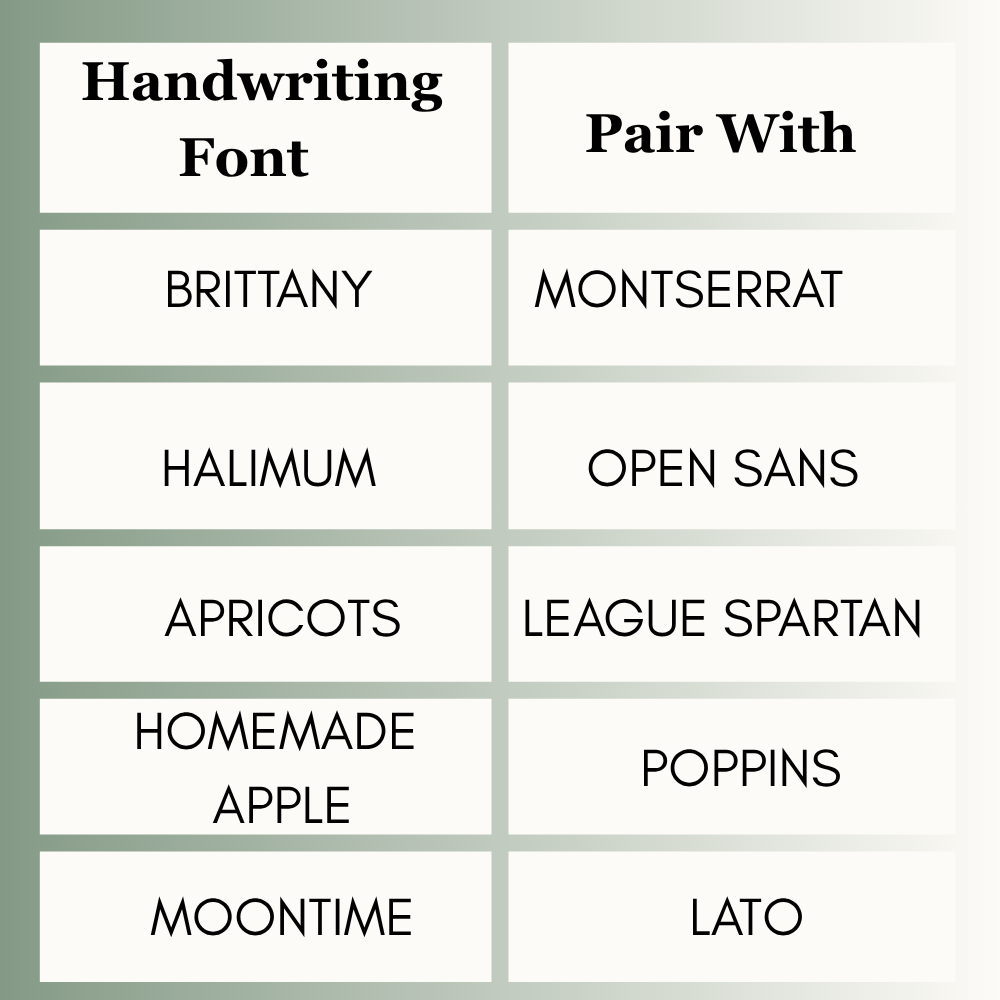
Use script fonts for headings. Use clean fonts for body text.
How to Find Handwriting Fonts in Canva
Finding fonts in Canva is simple.
- Open your design
- Click the text box
- Open the font menu
- Search words like:
- handwriting
- script
- cursive
- signature
- Test 2 to 3 fonts before choosing
Type your real text before deciding. Preview words can be misleading.
Canva Search Keywords to Find Better Fonts
If you do not know exact font names, use search terms inside Canva. This is one of the fastest ways to discover new options.
Search these words in the Canva font bar:
- handwriting
- script
- cursive
- signature
- brush
- elegant
- playful
- kids
- classy
- modern
Try different keywords to unlock more font ideas.
Before You Finalize Any Font
Always test your text in real words, not preview text. Then check it on mobile and desktop.
Many fonts look great on a laptop screen but become hard to read on mobile. Use a slightly larger font size if needed. Clear text usually performs better than overly decorative text.
Common Mistakes to Avoid
Many beginners make these mistakes:
- Using hard-to-read fonts
- Using script font for long paragraphs
- Mixing too many fonts
- Choosing style over clarity
- Ignoring mobile view
Keep it simple. Clean designs often perform better.
Which Canva Handwriting Font Is Best?
There is no one perfect answer. It depends on your goal.
- For branding: Brittany
- For signatures: Halimum
- For social posts: Apricots
- For casual designs: Homemade Apple
- For events: Moontime
Choose the font that matches your message.
FAQs
Many users like Brittany, Halimum, and Homemade Apple because they look stylish and easy to read.
Some are free, while others may require Canva Pro.
Homemade Apple and Gochi Hand feel natural and personal.
Yes, but keep the design clean and readable.
Conclusion
A good handwriting font does way more than just look cute on your screen. It honestly sets the whole vibe for your project. Like, think about it a wedding invite needs to look fancy, a bakery logo should feel warm and cozy, a teacher needs something clean but fun, and if you’re a creator, you just want people to stop scrolling. At the end of the day, it’s all about who you are making it for.
After making many designs for myself, I’ve seen how the right font can turn a totally basic, boring layout into something that looks super professional. If I could give you just one tip, it’s this: make sure people can actually read it first. Style comes second. And seriously, always check how it looks on your phone before you hit publish. You can start by trying out popular ones like Brittany, Halimum, or Homemade Apple, and then see what feels right for your own project.”

I’m Faraz, the founder and lead content strategist at The Vistly. With a background in digital marketing, I lead content and design strategy for the site, working alongside a small team of designers to create practical Canva tutorials, font pairings, and design resources for creators, small businesses, and marketers around the world. My goal with The Vistly is to make professional-quality design accessible to anyone, no design degree required.